<?xml version="1.0" encoding="utf-8"?><feed xmlns="http://www.w3.org/2005/Atom" ><generator uri="https://jekyllrb.com/" version="4.3.4">Jekyll</generator><link href="http://localhost:4001/feed.xml" rel="self" type="application/atom+xml" /><link href="http://localhost:4001/" rel="alternate" type="text/html" /><updated>2024-09-29T20:03:24-07:00</updated><id>http://localhost:4001/feed.xml</id><title type="html">Tux Engineering</title><subtitle>Engineering services for demanding projects</subtitle><entry><title type="html">Patching U-Boot boot script in Petalinux 2021.1</title><link href="http://localhost:4001/blog/2021/09/22/Patching-U-Boot-boot-script-in-Petalinux-2021.1.html" rel="alternate" type="text/html" title="Patching U-Boot boot script in Petalinux 2021.1" /><published>2021-09-22T17:16:00-07:00</published><updated>2021-09-22T17:16:00-07:00</updated><id>http://localhost:4001/blog/2021/09/22/Patching%20U-Boot%20boot%20script%20in%20Petalinux%202021.1</id><content type="html" xml:base="http://localhost:4001/blog/2021/09/22/Patching-U-Boot-boot-script-in-Petalinux-2021.1.html"><![CDATA[<p>The U-Boot boot script process was changed in Petalinux 2021.1, and modifying it now requires a recipe to overwrite the original script.</p>

<h3 id="overview">Overview</h3>

<p>In Petalinux 2020.1, U-Boot was modified to use the U-Boot “distro boot” feature, as previously discussed in the post <a href="/blog/2020/09/03/U-Boot-changes-to-distro-boot.html">U-Boot changes to distro boot</a>. In that version, the boot.scr was included in the meta-user layer and it was easily accessible for modification. In the latest 2021.1, the boot.scr script among other things, was moved to the Xilinx Yocto layer, and it requires a Yocto bbappend recipe to overwrite it.</p>

<h3 id="the-recipe">The recipe</h3>

<p>Yocto uses a bbappend file to modify another related recipe in what is called a BitBake append file. These files use a .bbappend file type suffix, and use the same naming convention as the recipe they modify with the .bb file suffix.</p>

<p>The bbappend follows the same directory structure as the original recipe, as we’ll see below. In Petalinux, the U-Boot recipe resides under &lt;project&gt;/components/yocto/layers/meta-xilinx/meta-xilinx-bsp/recipes-bsp/u-boot.</p>

<p>Below is the contents of the whole U-Boot recipe, where the u-boot-zynq-scr recipe also resides:</p>

<div class="language-plaintext highlighter-rouge"><div class="highlight"><pre class="highlight"><code>.
├── files
│   └── 0001-Remove-redundant-YYLOC-global-declaration.patch
├── u-boot_%.bbappend
├── u-boot-spl-zynq-init.inc
├── u-boot-xlnx_2021.1.bb
├── u-boot-xlnx-dev.bb
├── u-boot-xlnx.inc
├── u-boot-zynq-scr
│   ├── boot.cmd.generic
│   ├── boot.cmd.qspi.versal
│   ├── boot.cmd.sd.versal
│   ├── boot.cmd.sd.zynq
│   ├── boot.cmd.sd.zynqmp
│   ├── boot.cmd.ubifs
│   └── pxeboot.pxe
├── u-boot-zynq-scr.bb
└── u-boot-zynq-uenv.bb
</code></pre></div></div>

<h3 id="customizing">Customizing</h3>

<p>We will create a directory structure matching this under the meta-user layer, as follows under &lt;project&gt;/project-spec/meta-user/recipes-bsp/u-boot</p>

<div class="language-plaintext highlighter-rouge"><div class="highlight"><pre class="highlight"><code>.
├── files
│   ├── bsp.cfg
│   └── platform-top.h
├── u-boot-xlnx_%.bbappend
├── u-boot-zynq-scr
│   └── boot.cmd.generic
└── u-boot-zynq-scr.bbappend
</code></pre></div></div>

<p>We copied the original boot script from the Yocto recipe (i.e. boot.cmd.generic in this case) and placed it under the u-boot-zynq-scr directory just created. The contents are now available in the user area to make any custom changes.</p>

<p>The u-boot-zynq-scr.bbappend is a simple script that overwrites the boot script in the original recipe with the local copy, and its contents are:</p>

<div class="language-plaintext highlighter-rouge"><div class="highlight"><pre class="highlight"><code>FILESEXTRAPATHS_prepend := "${THISDIR}/${PN}:"

SRC_URI += "file://boot.cmd.generic"
</code></pre></div></div>

<p>The FILEEXTRAPATHS_prepend adds local files in this recipe to the original recipe, effectively overwriting (or adding) them. THISDIR is replaced with the current directory where the .bbappend resides, and PN is the package name, which in this case is u-boot-zynq-scr. This would be the directory location where the boot.cmd.generic file is searched.</p>

<h3 id="conclusion">Conclusion</h3>

<p>Modifying the boot script is useful for custom boot procedures, such as mixed boot media or to handle fallback in case the U-Boot booting process fails to load a binary. In this post, we showed how to handle a custom U-Boot boot script modification using a Yocto BitBake append process.</p>]]></content><author><name></name></author><category term="blog" /><category term="Petalinux" /><category term="U-Boot" /><category term="boot.scr" /><summary type="html"><![CDATA[The U-Boot boot script process was changed in Petalinux 2021.1, and modifying it now requires a recipe to overwrite the original script.]]></summary></entry><entry><title type="html">Temperature sensor</title><link href="http://localhost:4001/blog/2021/08/12/Temperature-sensor.html" rel="alternate" type="text/html" title="Temperature sensor" /><published>2021-08-12T15:00:00-07:00</published><updated>2021-08-12T15:00:00-07:00</updated><id>http://localhost:4001/blog/2021/08/12/Temperature-sensor</id><content type="html" xml:base="http://localhost:4001/blog/2021/08/12/Temperature-sensor.html"><![CDATA[<p>In this post we will look at controlling a temperature sensor IC over I2C from Linux, and pre-setting its critical output setpoint from U-Boot.</p>

<h3 id="hardware">Hardware</h3>

<p>The LM96163 temperature sensor is hooked up over I2C to two PL pins on the board. This I2C interface was originally controlled by a state machine in the fabric, without means to access it from Linux. This modification allows it to be preset from U-Boot to a particular critical setpoint temperature which may vary per application. It also allows the temperatures, alerts and fan controls to be operated from Linux. The LM96163 TCRIT output is a special alarm output that is tied to the power supply IC that in case of an over-temperature condition, will shut-off power to protect the system.</p>

<h3 id="zynqmp-configuration">ZynqMP configuration</h3>

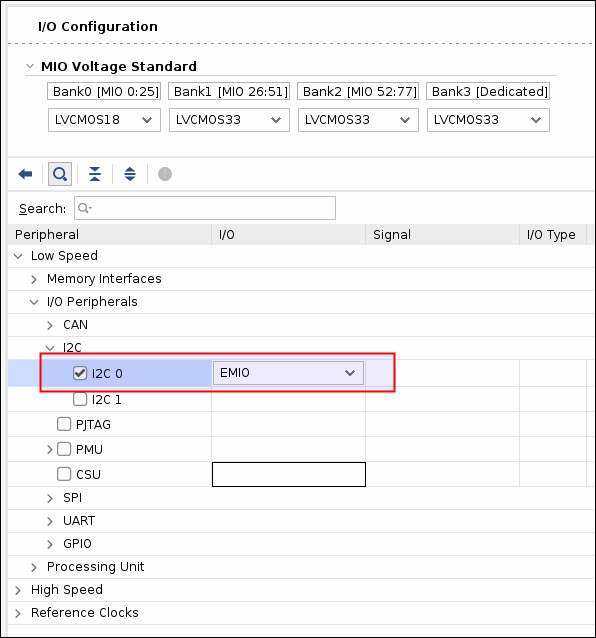
<p>The Zynq will need to have one of its two I2C controllers enabled and set to EMIO to access the PL pins.</p>

<p><img width="400px" src="/images/2021-08-12-Temperature-sensor/zynqmp-i2c0-emio.png" /></p>

<p>The PL pins are in turn defined in the .xdc file, with an added internal pull up.</p>

<div class="language-plaintext highlighter-rouge"><div class="highlight"><pre class="highlight"><code># Temperature controller LM96163 - Bank 84
set_property IOSTANDARD LVCMOS25         [get_ports temp_*]
set_property PULLUP TRUE                 [get_ports temp_*]
set_property PACKAGE_PIN AP10            [get_ports temp_smbclk]
set_property PACKAGE_PIN AP11            [get_ports temp_smbdata]
</code></pre></div></div>

<h3 id="kernel-configuration">Kernel configuration</h3>

<p>The kernel 5.10.x has support for the LM96163 through the LM63 driver, which conveniently comes enabled by default. The setting can be found in the kernel configuration as follows:</p>

<div class="language-plaintext highlighter-rouge"><div class="highlight"><pre class="highlight"><code>Symbol: SENSORS_LM63 [=y]                                
   Type  : tristate                                      
   Defined at drivers/hwmon/Kconfig:1141                 
     Prompt: National Semiconductor LM63 and compatibles 
     Depends on: HWMON [=y] &amp;&amp; I2C [=y]                  
     Location:                                           
       -&gt; Device Drivers                                 
   (1)   -&gt; Hardware Monitoring support (HWMON [=y])    
</code></pre></div></div>

<p>The last remaining item is the device tree, that specifies which I2C address (0x4c) and driver will handle the device, besides which I2C controller will be involved in the communication. We add a few lines to project-spec/meta-user/recipes-bsp/device-tree/files/system-user.dtsi</p>

<div class="language-plaintext highlighter-rouge"><div class="highlight"><pre class="highlight"><code>&amp;i2c0 {
  lm96163@4c {
    compatible = "national,lm96163";
    reg = &lt;0x4c&gt;;
  };
};
</code></pre></div></div>

<h3 id="kernel-access">Kernel access</h3>

<p>Once the system has booted up with these changes, the sysfs will have special files to control the driver and consequently the LM96163 device. The sysfs entries are shown here:</p>

<div class="language-plaintext highlighter-rouge"><div class="highlight"><pre class="highlight"><code>root@DAQ16-2021:~# ls -l /sys/bus/i2c/drivers/lm63/0-004c/hwmon/hwmon0/
total 0
-r--r--r-- 1 root root 4096 Apr 20 23:26 alarms
lrwxrwxrwx 1 root root    0 Apr 20 23:26 device -&gt; ../../../0-004c
-r--r--r-- 1 root root 4096 Apr 20 23:26 name
lrwxrwxrwx 1 root root    0 Apr 20 23:26 of_node -&gt; ../../../../../../../../firmware/devicetree/base/axi/i2c@ff020000/lm96163@2e
drwxr-xr-x 2 root root    0 Apr 20 23:26 power
-rw-r--r-- 1 root root 4096 Apr 20 23:26 pwm1
-rw-r--r-- 1 root root 4096 Apr 20 23:26 pwm1_auto_point10_pwm
-rw-r--r-- 1 root root 4096 Apr 20 23:26 pwm1_auto_point10_temp
-r--r--r-- 1 root root 4096 Apr 20 23:26 pwm1_auto_point10_temp_hyst
-rw-r--r-- 1 root root 4096 Apr 20 23:26 pwm1_auto_point11_pwm
&lt;...snip...&gt;
-rw-r--r-- 1 root root 4096 Apr 20 23:26 pwm1_auto_point9_temp
-r--r--r-- 1 root root 4096 Apr 20 23:26 pwm1_auto_point9_temp_hyst
-rw-r--r-- 1 root root 4096 Apr 20 23:26 pwm1_enable
lrwxrwxrwx 1 root root    0 Apr 20 23:26 subsystem -&gt; ../../../../../../../../class/hwmon
-r--r--r-- 1 root root 4096 Apr 20 23:26 temp1_input
-rw-r--r-- 1 root root 4096 Apr 20 23:26 temp1_max
-r--r--r-- 1 root root 4096 Apr 20 23:26 temp1_max_alarm
-r--r--r-- 1 root root 4096 Apr 20 23:26 temp2_crit
-r--r--r-- 1 root root 4096 Apr 20 23:26 temp2_crit_alarm
-rw-r--r-- 1 root root 4096 Apr 20 23:26 temp2_crit_hyst
-r--r--r-- 1 root root 4096 Apr 20 23:26 temp2_fault
-r--r--r-- 1 root root 4096 Apr 20 23:26 temp2_input
-rw-r--r-- 1 root root 4096 Apr 20 23:26 temp2_max
-r--r--r-- 1 root root 4096 Apr 20 23:26 temp2_max_alarm
-rw-r--r-- 1 root root 4096 Apr 20 23:26 temp2_min
-r--r--r-- 1 root root 4096 Apr 20 23:26 temp2_min_alarm
-rw-r--r-- 1 root root 4096 Apr 20 23:26 temp2_offset
-rw-r--r-- 1 root root 4096 Apr 20 23:26 temp2_type
-rw-r--r-- 1 root root 4096 Apr 20 23:21 uevent
-rw-r--r-- 1 root root 4096 Apr 20 23:26 update_interval
</code></pre></div></div>

<p>We can read the current remote diode temperature by reading these pseudo-files:</p>

<div class="language-plaintext highlighter-rouge"><div class="highlight"><pre class="highlight"><code>root@DAQ16-2021:~# cat /sys/bus/i2c/drivers/lm63/0-004c/hwmon/hwmon0/temp2_input
53125
</code></pre></div></div>

<p>…which would correspond to 53.125 degrees Celsius.</p>

<p>Perhaps intentionally to avoid rogue software from controlling the TCRIT output, the remote setpoint TCRIT setting is not writable in the default driver, but read-only.</p>

<h3 id="testing-from-u-boot">Testing from U-Boot</h3>

<p>In order to set the remote setpoint before Linux boots, we can either set it from the FSBL, or from U-Boot. In this case, we will modify a special U-Boot variable that executes at boot to run the proper I2C commands.</p>

<p>From U-Boot prompt, we interact with the I2C controller to access the LM96163 registers.</p>

<p>Scan I2C bus to find all enabled controllers:</p>

<div class="language-plaintext highlighter-rouge"><div class="highlight"><pre class="highlight"><code>ZynqMP&gt; i2c bus
Bus 0:  i2c@ff020000
ZynqMP&gt; i2c dev 0
Setting bus to 0
ZynqMP&gt; i2c probe
Valid chip addresses: 4C
</code></pre></div></div>

<p>Read various interesting registers:</p>

<p>Die ID (0x49)</p>

<div class="language-plaintext highlighter-rouge"><div class="highlight"><pre class="highlight"><code>ZynqMP&gt; i2c md 4c ff 1
00ff: 49    I
</code></pre></div></div>

<p>Read Remote T_CRIT setpoint (0x6E at POR)</p>

<div class="language-plaintext highlighter-rouge"><div class="highlight"><pre class="highlight"><code>ZynqMP&gt; i2c md 4c 19 1
0019: 6e    n
</code></pre></div></div>

<p>Read POR status (0x33)</p>

<div class="language-plaintext highlighter-rouge"><div class="highlight"><pre class="highlight"><code>ZynqMP&gt; i2c md 4c 33 1
0033: 00    .
</code></pre></div></div>

<p>Read Alert status (0x2)</p>

<div class="language-plaintext highlighter-rouge"><div class="highlight"><pre class="highlight"><code>ZynqMP&gt; i2c md 4c 2 1
0002: 00    .
</code></pre></div></div>

<p>Read Configuration (0x3)</p>

<div class="language-plaintext highlighter-rouge"><div class="highlight"><pre class="highlight"><code>ZynqMP&gt; i2c md 4c 3 1
0003: 00    .
</code></pre></div></div>

<p>We then set the remote TCRIT setpoint to 55 C (0x37) degrees.</p>

<p>Write Configuration (ALTMSK+TCRITOV)</p>

<div class="language-plaintext highlighter-rouge"><div class="highlight"><pre class="highlight"><code>ZynqMP&gt; i2c mw 4c 3 82 1
ZynqMP&gt; i2c md 4c 3 1
0003: 82    .
</code></pre></div></div>

<p>Write Remote Diode Temperature Filter (RDTF1+RDTF0)</p>

<div class="language-plaintext highlighter-rouge"><div class="highlight"><pre class="highlight"><code>ZynqMP&gt; i2c md 4c bf 1
00bf: 00    .
ZynqMP&gt; i2c mw 4c bf 6 1
ZynqMP&gt; i2c md 4c bf 1
00bf: 06    .
</code></pre></div></div>

<p>Set Remote T_CRIT setpoint to 0x37</p>

<div class="language-plaintext highlighter-rouge"><div class="highlight"><pre class="highlight"><code>ZynqMP&gt; i2c mw 4c 19 37 1
ZynqMP&gt; i2c md 4c 19 1
0019: 37    7
</code></pre></div></div>

<h3 id="programming-from-boot">Programming from boot</h3>

<p>Once we know how to program the remote TCRIT setpoint from U-Boot, it’s time to configure it to execute these commands on each boot. To this end, we use the special configuration option CONFIG_PREBOOT to run the commands before the U-Boot prompt shows up. This setting can be set in the bsp.cfg file used by U-Boot in project-spec/meta-user/recipes-bsp/u-boot/files/bsp.cfg</p>

<div class="language-plaintext highlighter-rouge"><div class="highlight"><pre class="highlight"><code>CONFIG_BOOTDELAY=5
CONFIG_BOOT_SCRIPT_OFFSET=0x2580000
CONFIG_ENV_OFFSET=0x2600000
CONFIG_PREBOOT="i2c dev 0; i2c md 4c 3 1; i2c mw 4c 3 82 1; i2c mw 4c bf 6 1; i2c mw 4c 19 37 1"
</code></pre></div></div>

<h3 id="testing">Testing</h3>

<p>All is ready for some testing. Once Linux has completed booting, we manually disconnect the fan from the heat sink, to force a simulated over temperature condition of 55 degrees Celsius. In about 20 seconds, the temperature rises and crosses the remote TCRIT setpoint, effectively powering down the supplies.</p>

<h3 id="conclusion">Conclusion</h3>

<p>We successfully managed to configure the Zynq to connect over I2C to the temperature sensor, pre-set its remote critical setpoint in U-Boot, to monitor the sensor’s registers from Linux, and finally to simulate an over temperature condition.</p>]]></content><author><name></name></author><category term="blog" /><category term="Petalinux" /><category term="U-Boot" /><category term="LM63" /><category term="LM96163" /><summary type="html"><![CDATA[In this post we will look at controlling a temperature sensor IC over I2C from Linux, and pre-setting its critical output setpoint from U-Boot.]]></summary></entry><entry><title type="html">Upgrading to Petalinux 2021</title><link href="http://localhost:4001/blog/2021/07/17/Upgrading-Petalinux-2021.html" rel="alternate" type="text/html" title="Upgrading to Petalinux 2021" /><published>2021-07-17T10:00:00-07:00</published><updated>2021-07-17T10:00:00-07:00</updated><id>http://localhost:4001/blog/2021/07/17/Upgrading-Petalinux-2021</id><content type="html" xml:base="http://localhost:4001/blog/2021/07/17/Upgrading-Petalinux-2021.html"><![CDATA[<p>The latest Petalinux 2021.1 from Xilinx comes with a few improvements and changes that can also trip the unsuspecting user.</p>

<h3 id="introduction">Introduction</h3>

<p>In this post we will target the upgrade from Petalinux 2020.2 to 2021.1 focusing on the process and the changes that make the upgrade as seamless as can be.</p>

<h3 id="upgrading">Upgrading</h3>

<p>In our experience, upgrading from version to version has rarely been a trouble free endeavor. Some of the changes involve aligning with the underlying Yocto system and often modifications in Petalinux itself. Our suggested update path is to not update from a previous project, but rather create a new 2021.1 project and configure it from scratch, using data from the old project. While this sounds tedious and slow, it will save valuable time over the alternative.
The process would be summarized as follows:</p>

<ul>
  <li>Open the older project in a parallel window.</li>
  <li>Create Petalinux project, <em>petalinux-create -t project -n &lt;name&gt; –template zynqMP</em></li>
  <li>Import hardware description .xsa, <em>petalinux-config –get-hw-description &lt;path-to-xsa&gt;</em></li>
  <li>Compare the older project menuconfig settings and apply to the new project where necessary.</li>
  <li>Open the rootfs menuconfig, <em>petalinux-config -c rootfs</em></li>
  <li>Again compare to the old project’s rootfs.</li>
  <li>Lastly, set the new configuration items.</li>
</ul>

<h3 id="changes">Changes</h3>

<p>The most substantial change in 2021.1 at first sight is the U-Boot script configuration. As you recall, in 2020.2 this was done as a hand-modifiable script under the u-boot recipe, that required changing several offsets and sizes to align with the bootable media formatting.</p>

<h5 id="mac-address">MAC address</h5>

<p>The Ethernet MAC address is now defined as the invalid ff:ff:ff:ff:ff:ff address. If defined, it will be set to the device tree. If not defined, it will attempt to read it from EEPROM, and failing that, it will be set to a random address.</p>

<h5 id="bootable-storage">Bootable storage</h5>

<p>The Advanced bootable images storage settings was removed from the Subsystem AUTO settings, replaced by…</p>

<h5 id="u-boot-script">U-Boot script</h5>

<p>The newly added u-boot script configuration, in which it defines the offsets in the boot.scr script and other settings that used to be the above image storage settings.</p>

<p>Here’s the QSPI image offsets options:</p>

<div class="language-plaintext highlighter-rouge"><div class="highlight"><pre class="highlight"><code>(0x3F00000) QSPI/OSPI Kernel offset (NEW)
(0x1D00000) QSPI/OSPI Kernel size (NEW)
(0x5D00000) QSPI/OSPI Ramdisk offset (NEW)
(0x1D00000) QSPI/OSPI Ramdisk size (NEW)
(0x3F80000) QSPI/OSPI fit image offset (NEW)
(0x3F00000) QSPI/OSPI fit image size (NEW)
</code></pre></div></div>

<p>These offsets and sizes will be used to generate the U-Boot boot.scr. There’s additional options for JTAG/DDR and NAND image offsets.</p>

<h5 id="u-boot">U-Boot</h5>

<p>I had to configure U-Boot (<em>petalinux-config -c u-boot</em>) to disable “ARM Architecture -&gt; Reading MAC address from EEPROM” or it would attempt to read from a non-existent flash on this hardware. Also changed the “Boot Script Offset” to match QSPI partition for the boot.scr. Ended up looking like this:</p>

<div class="language-plaintext highlighter-rouge"><div class="highlight"><pre class="highlight"><code># CONFIG_ZYNQ_MAC_IN_EEPROM is not set
CONFIG_BOOTDELAY=5
CONFIG_BOOT_SCRIPT_OFFSET=0x2580000
CONFIG_ENV_OFFSET=0x2600000
</code></pre></div></div>

<h3 id="adding-u-boot-environment-commands-to-petalinux">Adding U-Boot environment commands to Petalinux</h3>

<p>The Linux commands to access and modify the U-Boot’s environment are <em>fw_printenv</em> and <em>fw_setenv</em>. They are built as part of the U-Boot codebase and require special handling in 2021.1, due to their recipe being missing in Yocto meta layer. I had to copy the entire recipe from 2020.2 (copied in turn from 2019.2) and modify it slightly for 2021.1.</p>

<ul>
  <li>Create recipes-bsp/u-boot-fw-utils</li>
  <li>Copy u-boot-fw-utils_2019.07.bb and u-boot-common.inc from 2020.2 components/yocto/layers/meta/recipes-bsp/u-boot to the u-boot-fw-utils directory</li>
  <li>Copy u-boot-fw-utils_%.bbappend to u-boot-fw-utils</li>
  <li>Modify u-boot-fw-utils_%.bbappend as below</li>
  <li>Add a u-boot-fw-utils subdirectory with the <em>fw_env.config</em> file</li>
</ul>

<p>The u-boot-fw-utils looks like this:</p>

<div class="language-plaintext highlighter-rouge"><div class="highlight"><pre class="highlight"><code>FILESEXTRAPATHS_prepend := "${THISDIR}/${PN}:"

SRCREV = "0b0c6af38738f2c132cfd41a240889acaa031c8f"

SRC_URI += "git://github.com/Xilinx/u-boot-xlnx.git;protocol=https"
SRC_URI += " file://fw_env.config"

# remove patches introduced in older version
SRC_URI_remove = "file://0001-CVE-2019-13103.patch"
SRC_URI_remove = "file://0002-CVE-2019-13104.patch"
SRC_URI_remove = "file://0003-CVE-2019-13105.patch"
SRC_URI_remove = "file://0004-CVE-2019-13106.patch"
SRC_URI_remove = "file://0005-CVE-2019-14192-14193-14199.patch"
SRC_URI_remove = "file://0006-CVE-2019-14197-14200-14201-14202-14203-14204.patch"
SRC_URI_remove = "file://0007-CVE-2019-14194-14198.patch"
SRC_URI_remove = "file://0008-CVE-2019-14195.patch"
SRC_URI_remove = "file://0009-CVE-2019-14196.patch"

do_install_append() {
  install -d ${D}${sysconfdir}
  install -m 0644 ${WORKDIR}/fw_env.config ${D}${sysconfdir}/fw_env.config
}

PACKAGE_ARCH = "${MACHINE_ARCH}"
</code></pre></div></div>

<p>The fw_env.config looks like this:</p>

<div class="language-plaintext highlighter-rouge"><div class="highlight"><pre class="highlight"><code># NOR example
# MTD device name	Device offset	Env. size	Flash sector size	Number of sectors
/dev/mtd2		0x0000		0x80000		0x4000

$ tree
├── u-boot-common.inc
├── u-boot-fw-utils
│   └── fw_env.config
├── u-boot-fw-utils_2019.07.bb
└── u-boot-fw-utils_%.bbappend
</code></pre></div></div>

<h3 id="gotchas">Gotchas</h3>

<h4 id="no-dev-on-rootfs">No ‘/dev’ on rootfs</h4>

<p>Building the project and loading it on the hardware initially throws a “There’s no ‘/dev’ on rootfs”. This happens due to using a small RAM disk for rootfs built-in the FIT image by default, intended to be a temporary filesystem in use before loading the real filesystem in flash, i.e. in eMMC. For users that don’t need this, the workaround is to rename the INITRD image name to <em>petalinux-image-minimal</em>.</p>

<p>petalinux-config -&gt; Image packaging configuration -&gt; INITRAMFS/INITRD Image name</p>

<h4 id="product-version">Product version</h4>

<p>The /etc/petalinux/version and product do not take the values set in petalinux-config; instead they read <em>2021.1</em> and <em>zynqmp-generic</em> respectively. To fix this, this workaround (AR#76764) is needed.</p>

<p>In this file <plnx-proj-root>/project-spec/meta-user/conf/petalinuxbsp.conf set the values to apply:</plnx-proj-root></p>

<div class="language-plaintext highlighter-rouge"><div class="highlight"><pre class="highlight"><code>PETALINUX_PRODUCT_pn-base-files-plnx = "zynqmp-test"
PETALINUX_VERSION_pn-base-files-plnx = "2021.1.15"
</code></pre></div></div>

<p>Clean the base-files-plnx sstate cache and rebuild the base-files-plnx recipes:</p>

<div class="language-plaintext highlighter-rouge"><div class="highlight"><pre class="highlight"><code>$ petalinux-build -c base-files-plnx -x cleansstate
$ petalinux-build -x cleansstate
$ petalinux-build
</code></pre></div></div>

<h4 id="initscripts-output">Initscripts output</h4>

<p>In 2021.1 the initscripts output don’t actually produce any output to the console, even though they do run. Xilinx admits this is an issue and provided a workaround.</p>

<p>Create a sysvinit directory and recipe.</p>

<div class="language-plaintext highlighter-rouge"><div class="highlight"><pre class="highlight"><code>$ mkdir -p project-spec/meta-user/recipes-core/sysvinit
$ touch -p project-spec/meta-user/recipes-core/sysvinit/sysvinit_%.bbappend
</code></pre></div></div>

<p>Disable bootlog deamon in do_install bitbake task.</p>

<div class="language-plaintext highlighter-rouge"><div class="highlight"><pre class="highlight"><code>do_install_append () {
	install -d ${D}${sysconfdir}/default
	echo "BOOTLOGD_ENABLE=N" &gt;&gt; ${D}${sysconfdir}/default/bootlogd
}
</code></pre></div></div>

<p>Clean the sysvinit and rootfs sstate cache and rebuild it.</p>

<div class="language-plaintext highlighter-rouge"><div class="highlight"><pre class="highlight"><code>$ petalinux-build -c sysvinit -x cleansstate; petalinux-build -x cleansstate
$ petalinux-build
</code></pre></div></div>

<h4 id="fix-usb-support">Fix USB support</h4>

<p>USB is plainly broken in 2021.1, and this patch from @aravinds fortunately fixes it.</p>

<p><em>“Deselect the PIPE clock when operating in USB2.0 only mode. Due to USB
controller getting reset, the pipe clock control register was by default
selecting the Serdes as the clock source. This was causing the issue
when the Serdes is disabled and only USB2.0 mode is selected.”</em></p>

<p>https://forums.xilinx.com/t5/Embedded-Linux/ZynqMP-Yocto-no-USB-with-2021-1/m-p/1269990</p>

<h3 id="conclusion">Conclusion</h3>

<p>There were a few changes in Petalinux 2021.1 that caused a few headaches but are better explained in the datasheet than previous upgrades. It’s highly recommended to read the section “Migration” from ug1144 to get more insight into these changes. In this post we summarized them and provided workarounds.</p>]]></content><author><name></name></author><category term="blog" /><category term="Petalinux" /><category term="U-Boot" /><category term="2021" /><summary type="html"><![CDATA[The latest Petalinux 2021.1 from Xilinx comes with a few improvements and changes that can also trip the unsuspecting user.]]></summary></entry><entry><title type="html">QSPI boot then loading from MMC</title><link href="http://localhost:4001/blog/2021/05/12/Booting-from-QSPI-then-MMC.html" rel="alternate" type="text/html" title="QSPI boot then loading from MMC" /><published>2021-05-12T14:26:00-07:00</published><updated>2021-05-12T14:26:00-07:00</updated><id>http://localhost:4001/blog/2021/05/12/Booting-from-QSPI-then-MMC</id><content type="html" xml:base="http://localhost:4001/blog/2021/05/12/Booting-from-QSPI-then-MMC.html"><![CDATA[<p>The flexibility of U-Boot distro boot feature is exercised in this post, where we configure the target to boot from QSPI flash, then load the rest of the binaries from MMC.</p>

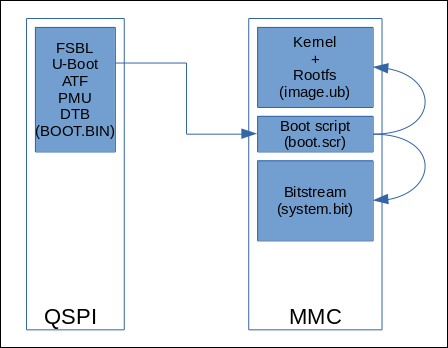
<h3 id="introduction">Introduction</h3>

<p>The boot partition in QSPI will contain the necessary binaries, but will exclude the bitstream, the kernel and the rootfs. It will contain the FSBL, ATF, PMU, device tree and U-Boot, all binaries that would rarely need updating after the system is set up. U-Boot will read its boot script from MMC with instructions how to load the rest of the binaries also in MMC.</p>

<p><img width="400px" src="/images/2021-05-12-Booting-from-QSPI-then-MMC/binaries-qspi-mmc.png" /></p>

<h3 id="u-boot-handling-boot-script">U-Boot handling boot script</h3>

<p>This is a detailed summary how U-Boot handles the boot script internally for insight into the boot process.
U-Boot is hardcoded to execute one command upon boot after the countdown expires, namely <em>bootcmd</em>. This is usually defined in the default U-Boot environment as:</p>

<div class="language-plaintext highlighter-rouge"><div class="highlight"><pre class="highlight"><code>bootcmd=run distro_bootcmd
</code></pre></div></div>

<p>The <em>distro_bootcmd</em> is in turn defined as:</p>

<div class="language-plaintext highlighter-rouge"><div class="highlight"><pre class="highlight"><code>distro_bootcmd=
	scsi_need_init=;
	for target in ${boot_targets};
		do run bootcmd_${target};
	done
</code></pre></div></div>

<p>The boot_targets is a list defined for potential boot sources, which is prepended by a value read from the boot mode pins, QSPI (first qspi0) in this case:</p>

<div class="language-plaintext highlighter-rouge"><div class="highlight"><pre class="highlight"><code>qspi0 jtag mmc0 mmc1 qspi0 nand0 usb0 usb1 scsi0 pxe dhcp
</code></pre></div></div>

<p>When booting from QSPI, this command below will be called, which initializes the QSPI and reads the boot script into memory from the expected offset, and proceeds to execute it.</p>

<div class="language-plaintext highlighter-rouge"><div class="highlight"><pre class="highlight"><code>bootcmd_qspi0=
 	sf probe 0 0 0 &amp;&amp;
 	sf read $scriptaddr $script_offset_f $script_size_f &amp;&amp;
 	echo QSPI: Trying to boot script at ${scriptaddr} &amp;&amp;
 	source ${scriptaddr}
</code></pre></div></div>

<p>In case of the MMC boot, the <em>boot_targets</em> would look instead as:</p>

<div class="language-plaintext highlighter-rouge"><div class="highlight"><pre class="highlight"><code>mmc0 jtag mmc0 mmc1 qspi0 nand0 usb0 usb1 scsi0 pxe dhcp
</code></pre></div></div>

<p>Which will cause this command to be called:</p>

<div class="language-plaintext highlighter-rouge"><div class="highlight"><pre class="highlight"><code>bootcmd_mmc0=
	devnum=0;
	run mmc_boot
</code></pre></div></div>

<p>Which is defined as:</p>

<div class="language-plaintext highlighter-rouge"><div class="highlight"><pre class="highlight"><code>mmc_boot=
	if mmc dev ${devnum};
		then devtype=mmc;
		run scan_dev_for_boot_part;
	fi
</code></pre></div></div>

<p>That checks for the MMC device and pre-sets the <em>devtype</em> variable, then calls <em>scan_dev_for_boot_part</em>.
This will check if there is an MMC partition that is bootable, and if none found will default to the first partition.</p>

<div class="language-plaintext highlighter-rouge"><div class="highlight"><pre class="highlight"><code>scan_dev_for_boot_part=
	part list ${devtype} ${devnum} -bootable devplist;
	env exists devplist || setenv devplist 1;
	for distro_bootpart in ${devplist};
		do if fstype ${devtype} ${devnum}:${distro_bootpart} bootfstype;
		then run scan_dev_for_boot; fi;
		done;
	setenv devplist
</code></pre></div></div>

<p>This will scan the boot partition for boot scripts “extlinux” or “boot.scr”…</p>

<div class="language-plaintext highlighter-rouge"><div class="highlight"><pre class="highlight"><code>scan_dev_for_boot=
	echo Scanning ${devtype} ${devnum}:${distro_bootpart}...;
	for prefix in ${boot_prefixes};
		do
			run scan_dev_for_extlinux;
			run scan_dev_for_scripts;
		done;
	run scan_dev_for_efi;
</code></pre></div></div>

<p>Check for scripts and attempt to run them:</p>

<div class="language-plaintext highlighter-rouge"><div class="highlight"><pre class="highlight"><code>scan_dev_for_scripts=
	for script in ${boot_scripts};
		do if test -e ${devtype} ${devnum}:${distro_bootpart} ${prefix}${script};
			then echo Found U-Boot script ${prefix}${script};
			run boot_a_script;
			echo SCRIPT FAILED: continuing...;
		fi;
	done
</code></pre></div></div>

<p>Finally load the script if found and execute it:</p>

<div class="language-plaintext highlighter-rouge"><div class="highlight"><pre class="highlight"><code>boot_a_script=
	load ${devtype} ${devnum}:${distro_bootpart} ${scriptaddr} ${prefix}${script};
	source ${scriptaddr}
</code></pre></div></div>

<p>The boot script (boot.scr) by default contains another loop over the boot targets:</p>

<div class="language-plaintext highlighter-rouge"><div class="highlight"><pre class="highlight"><code>for boot_target in ${boot_targets};
do
	if test "${boot_target}" = "jtag" ; then
    ...
 	if test "${boot_target}" = "mmc0" || test "${boot_target}" = "mmc1" ; then
	...
	if test "${boot_target}" = "xspi0" || test "${boot_target}" = "qspi" || test "${boot_target}" = "qspi0"; then
	...
done
</code></pre></div></div>

<p>This boot script needs some hacking to make it load the bitstream image from MMC but while it boots from QSPI.
We will add a node that will:</p>

<ul>
  <li>Check if boot mode is QSPI, and</li>
  <li>Check if the variable <em>devtype</em> is set to “mmc” as seen defined above in the <em>mmc_boot</em> command.</li>
</ul>

<p>If these two conditions are set, we will proceed to [attempt to] load the bitstream and FIT image from MMC.
We’ll change the test for “mmc0” as <em>boot_target</em> and replace it with our custom test, adding the bitstream loading. The scripts sets an arbitrary address to temporarily load the bistream from MMC (<em>fatload</em> command) and then program into the programmable logic (PL) with the <em>fpga</em> command. The bitstream size is fixed for this device.</p>

<p>From:</p>

<div class="language-plaintext highlighter-rouge"><div class="highlight"><pre class="highlight"><code>if test "${boot_target}" = "mmc0" || test "${boot_target}" = "mmc1" ; then
</code></pre></div></div>

<p>To:</p>

<div class="language-plaintext highlighter-rouge"><div class="highlight"><pre class="highlight"><code>if test "${boot_target}" = "qspi0" &amp;&amp; test "${devtype}" = "mmc" ; then
	if test -e ${devtype} ${devnum}:${distro_bootpart} /system.bit; then
		bitstream_addr=0x10000000;
		bitstream_size=0x20d795f;
		fatload ${devtype} ${devnum}:${distro_bootpart} ${bitstream_addr} system.bit;
		fpga load 0 ${bitstream_addr} ${bitstream_size};
	fi
&lt;proceed with loading from MMC as usual&gt;
</code></pre></div></div>

<h3 id="configuration">Configuration</h3>

<p>In the Petalinux configuration menuconfig (petalinux-config) we’ll ensure the bootable images are set properly to boot from QSPI (primary flash) then look for the kernel image in MMC (primary SD). Other settings will remain unchanged from the stock configuration.</p>

<ul>
  <li>petalinux-config
    <ul>
      <li>-&gt; Subsystem AUTO hardware Settings</li>
      <li>-&gt; Advanced bootable images storage Settings
        <ul>
          <li>boot image settings -&gt; primary flash</li>
          <li>u-boot env partition settings -&gt; primary flash</li>
          <li>kernel image settings -&gt; <strong>primary sd</strong></li>
          <li>jffs2 rootfs image settings -&gt; primary flash</li>
          <li>dtb image settings -&gt; from boot image</li>
        </ul>
      </li>
      <li>-&gt; Image Packaging Configuration
        <ul>
          <li>-&gt; Root filesystem type (INITRD)</li>
        </ul>
      </li>
    </ul>
  </li>
</ul>

<p>The U-Boot boot script (boot.scr) is in charge of loading the rest of the binaries from other media, in this case from MMC. The default boot.scr configuration loads the binaries from the same boot media identified by the boot mode pins. We will modify this boot script to load the binaries from MMC instead of from QSPI as would be the default. The source boot script can be found in &lt;project&gt;/project-spec/meta-user/recipes-bsp/u-boot/u-boot-zynq-scr/boot.cmd.default.initrd.
The <em>if</em> entry we’ve added above will load the binaries from MMC only when the boot mode is set to QSPI and the device type is set to “mmc”. The device type is set when U-Boot tests for potential boot sources and scans the <em>boot_targets</em> list.</p>

<p>Once the Petalinux project has been built, the BOOT.BIN needs to be packaged, and in this case  including the bitstream is not necessary, as follows:</p>

<div class="language-plaintext highlighter-rouge"><div class="highlight"><pre class="highlight"><code>[user@host]$ petalinux-package --boot --u-boot --fsbl --pmufw --force
</code></pre></div></div>

<p>The packaged BOOT.BIN will be generated under &lt;project&gt;/images/linux directory.</p>

<h3 id="copying-binaries-to-target">Copying binaries to target</h3>

<p>The generated binaries need to be programmed into the non-volatile memories (QSPI &amp; MMC). The BOOT.BIN will be programmed into QSPI, and the boot script (boot.scr), bitstream (system.bit) and FIT image (image.ub) will go in the first partition of the MMC device.
The BOOT.BIN may be programmed into QSPI in several ways.</p>

<ul>
  <li>Vivado Hardware Manager.</li>
  <li>Boot into U-Boot then load from a TFTP server, then writing to QSPI with “sf” commands.
    <ul>
      <li>petalinux-boot –jtag –u-boot</li>
      <li>Stop U-Boot at prompt
        <ul>
          <li>ZynqMP&gt; dhcp</li>
          <li>ZynqMP&gt; tftpboot 0x10000000 <server-IP>:BOOT.BIN</server-IP></li>
          <li>ZynqMP&gt; sf probe</li>
          <li>ZynqMP&gt; sf write 0x10000000 0x0 0x164820</li>
        </ul>
      </li>
    </ul>
  </li>
  <li>Boot into U-Boot and load binaries from a host over JTAG, then program into QSPI.
    <ul>
      <li>petalinux-boot –jtag –u-boot</li>
      <li>Stop U-Boot at prompt</li>
      <li>From xsct, load BOOT.BIN binary into memory
        <ul>
          <li>xsct% dow -data BOOT.BIN 0x10000000</li>
        </ul>
      </li>
      <li>On U-Boot, burn to QSPI using sf commands
        <ul>
          <li>ZynqMP&gt; sf probe</li>
          <li>ZynqMP&gt; sf write 0x10000000 0x0 0x164820</li>
        </ul>
      </li>
    </ul>
  </li>
  <li>Using <em>program_flash</em> host app to program directly into QSPI over JTAG.
    <ul>
      <li>[user@host]$ program_flash -f BOOT.BIN -offset 0x0 -flash_type qspi_dual_parallel -fsbl zynqmp_fsbl.elf -cable type xilinx_tcf url tcp:192.168.1.177:3121</li>
    </ul>
  </li>
  <li>From within Linux, using the <em>flashcp</em> command.
    <ul>
      <li>root@target]# flashcp -v BOOT.BIN /dev/mtd0</li>
    </ul>
  </li>
</ul>

<p>The binaries may be loaded into MMC memory in a number of ways as well. The most efficient is probably on a running Linux system, copying them over Ethernet (i.e. SSH). If Linux is not running on the target, then a similar procedure can be done as shown above, to load the binaries over JTAG and then from U-Boot to program them onto MMC, using the command:</p>

<div class="language-plaintext highlighter-rouge"><div class="highlight"><pre class="highlight"><code>ZynqMP&gt; fatwrite mmc 0 &lt;address&gt; image.ub &lt;size-in-hex&gt;
</code></pre></div></div>

<h3 id="conclusion">Conclusion</h3>

<p>This post presented a method to boot from QSPI and then load the rest of the binaries from MMC using U-Boot boot script to handle the process, with plenty of detail how the internals work.</p>]]></content><author><name></name></author><category term="blog" /><category term="Petalinux" /><category term="U-Boot" /><category term="QSPI" /><category term="MMC" /><summary type="html"><![CDATA[The flexibility of U-Boot distro boot feature is exercised in this post, where we configure the target to boot from QSPI flash, then load the rest of the binaries from MMC.]]></summary></entry><entry><title type="html">U-Boot handling MAC address</title><link href="http://localhost:4001/blog/2020/09/16/U-Boot-handling-MAC-address.html" rel="alternate" type="text/html" title="U-Boot handling MAC address" /><published>2020-09-16T10:26:00-07:00</published><updated>2020-09-16T10:26:00-07:00</updated><id>http://localhost:4001/blog/2020/09/16/U-Boot-handling-MAC-address</id><content type="html" xml:base="http://localhost:4001/blog/2020/09/16/U-Boot-handling-MAC-address.html"><![CDATA[<p>There’s several ways for U-Boot to store the Ethernet MAC address in non-volatile memory set at production time. In this post, we’ll analyze the different approaches and point to solutions how to implement them.</p>

<h3 id="mac-address">MAC address</h3>

<p>The media access control address <a href="https://en.wikipedia.org/wiki/MAC_address">MAC address</a> is a unique identifier composed of six octets that network devices use to identify themselves on a network. These addresses are generally assigned at production time and saved to a ROM device or to a non-volatile memory device such as flash that is read at boot time. We’ll look at storing the MAC address in a flash device.</p>

<h3 id="storage">Storage</h3>

<p>In general, the MAC address will be stored in an on-board flash device, using a digital interface such as SPI or I2C accessible to the embedded processor. Sometimes, this device uses a non-standard interface that is accessed using a custom interface, and this would make it more complicated for U-Boot to read it, requiring custom code. Even rarer and also more complicated, is using a custom PL interface to read the device, also requiring a custom solution.
In order from simplest to hardest to implement thus:</p>

<ul>
  <li>U-boot environment partition.</li>
  <li>I2C interface to supported flash device.</li>
  <li>SPI interface to supported flash device.</li>
  <li>SPI interface to unsupported flash device.</li>
  <li>Custom PS interface to flash device.</li>
  <li>Custom PL interface to flash device.</li>
</ul>

<h3 id="u-boot">U-Boot</h3>

<p>The bootloader has built-in support for storing the MAC address in its flash-based environment partition, if present. The U-Boot variable <em>ethaddr</em> is used to hold the Ethernet MAC address.</p>

<div class="language-plaintext highlighter-rouge"><div class="highlight"><pre class="highlight"><code>UBoot&gt; printenv ethaddr
00:1E:02:03:04:05
</code></pre></div></div>

<p>This variable can be modified using the setenv command, but this is only a volatile value thus far and will be lost if power goes down.</p>

<div class="language-plaintext highlighter-rouge"><div class="highlight"><pre class="highlight"><code>UBoot&gt; setenv ethaddr 01:02:03:04:05:06
</code></pre></div></div>

<p>To save this MAC address to U-Boot’s environment flash partition, the saveenv command is used. Note that all of U-Boot variables are saved to this partition.</p>

<div class="language-plaintext highlighter-rouge"><div class="highlight"><pre class="highlight"><code>UBoot&gt; saveenv
</code></pre></div></div>

<p>It’s important to note that U-Boot will only write the ethaddr variable to the partition once. It will refuse to overwrite a previously written value. In this case, it’s best to format the U-Boot partition (i.e. using “<em>run eraseenv</em>” or some other way) and re-save it again.</p>

<p>You can tell when U-Boot is reading its environment partition when it prints “Loading environment from …”. When it doesn’t, it prints “Warning: bad CRC, using default environment” at boot time. You can force U-Boot to use the default environment instead, using the command “<em>env default -a</em>”.</p>

<p>Linux uses a couple of binaries that can read U-Boot’s environment partition and even set variables. The Petalinux (i.e. yocto) package <em>u-boot-fw-utils</em> contains the fw_printenv, fw_saveenv and fw_setenv binaries.</p>

<h4 id="fixing-unknown-saveenv-command">Fixing unknown saveenv command</h4>

<p>In previous to 2020.1, the saveenv command was available by default and somehow this has changed. To re-enable the saveenv command we need to add these configuration settings in meta-user/recipes-bsp/u-boot/files/</p>

<div class="language-plaintext highlighter-rouge"><div class="highlight"><pre class="highlight"><code>CONFIG_ENV_IS_IN_SPI_FLASH=y
CONFIG_ENV_SIZE=0x40000
CONFIG_ENV_SECT_SIZE=0x20000
CONFIG_ENV_OFFSET=0x2600000
</code></pre></div></div>

<p>It should be noted that CONFIG_ENV_SIZE is not taken into account when saving the environment partition, as the variable script_size_f does not change from its default 0x80000 value. The file u-boot-xlnx/include/configs/xilinx_zynqmp.h must be patched to change this default, to match the QSPI bootenv partition size.</p>

<div class="language-plaintext highlighter-rouge"><div class="highlight"><pre class="highlight"><code>diff --git a/include/configs/xilinx_zynqmp.h b/include/configs/xilinx_zynqmp.h
index a3461214c9..3361474bcc 100644
--- a/include/configs/xilinx_zynqmp.h
+++ b/include/configs/xilinx_zynqmp.h
@@ -116,7 +116,7 @@
 	"kernel_addr_r=0x18000000\0" \
 	"scriptaddr=0x20000000\0" \
 	"ramdisk_addr_r=0x02100000\0" \
-	"script_size_f=0x80000\0" \
+	"script_size_f=0x40000\0" \
</code></pre></div></div>

<h3 id="reading-from-flash">Reading from flash</h3>

<p>U-Boot also has built-in access to I2C EEPROM/flash storage and can automatically fetch the six octets from a given offset at boot time.
In the U-Boot configuration, the I2C_EEPROM setting enables a set of parameters to address the EEPROM device, such as I2C address, bus, size, etc.
For Zynq/MP, the ZYNQ_GEM_I2C_MAC_OFFSET defines the memory offset where to read the octets from, using the built-in I2C controller.</p>

<h3 id="qspi-flash">QSPI flash</h3>

<p>Besides reading its environment partition, U-Boot can also be patched to read its MAC address from an arbitrary address from QSPI flash. I got this inspiration from Digilent’s Genesys Github repo <a href="https://github.com/Digilent/Genesys-ZU-OOB-os/commit/d5bbfcc8647172597fc5806f6e44c6a17ce258a2">Read MAC in flash</a> patch, and updated it for Petalinux 2020.1. Credit where due.</p>

<p>The change involves replacing the zynq_board_read_rom_ethaddr function in U-Boot’s source board/xilinx/common/board.c by a SPI version. This function reads the QSPI offset and returns the octets on the ethaddr argument.
The offset is set by the newly patched configuration option CONFIG_ZYNQ_GEM_SPI_OFFSET.</p>

<div class="language-plaintext highlighter-rouge"><div class="highlight"><pre class="highlight"><code>int zynq_board_read_rom_ethaddr(unsigned char *ethaddr)
{
	int ret = -EINVAL;

#if defined(CONFIG_ZYNQ_GEM_SPI_MAC_OFFSET)
	struct spi_flash *flash;
	flash = spi_flash_probe(CONFIG_SF_DEFAULT_BUS,
				CONFIG_SF_DEFAULT_CS,
				CONFIG_SF_DEFAULT_SPEED,
				CONFIG_SF_DEFAULT_MODE);

	if (!flash) {
		printf("no flash\n");
		printf("SPI(bus:%u cs:%u) probe failed\n",
			CONFIG_SF_DEFAULT_BUS,
			CONFIG_SF_DEFAULT_CS);
		return 0;
	}

	if (spi_flash_read(flash, CONFIG_ZYNQ_GEM_SPI_MAC_OFFSET, 6, ethaddr))
		printf("%s:SPI MAC address read failed\n", __func__);
 
	printf("%s: SPI ethaddr: %02X:%02X:%02X:%02X:%02X:%02X\n", __func__, ethaddr[0], ethaddr[1], ethaddr[2], ethaddr[3], ethaddr[4], ethaddr[5]);

	if (flash)
		spi_flash_free(flash);

#endif

	return ret;
}
</code></pre></div></div>

<p>Then the file containing the setting may be called user_add-SPI-MAC-offset.cfg</p>

<div class="language-plaintext highlighter-rouge"><div class="highlight"><pre class="highlight"><code>CONFIG_ZYNQ_GEM_SPI_MAC_OFFSET=0x2000
</code></pre></div></div>

<p>And putting it all together, the <a href="/images/2020-09-16-U-Boot-handling-MAC-address/0001-Read-MAC-address-from-QSPI.patch">patch</a> and the configuration settings in meta-user/recipes-bsp/u-boot/u-boot-xlnx_%.bbappend</p>

<div class="language-plaintext highlighter-rouge"><div class="highlight"><pre class="highlight"><code>SRC_URI += "file://platform-top.h \
            file://devtool-fragment.cfg \
            file://user_add-SPI-MAC-offset.cfg \
            file://0001-Read-MAC-address-from-QSPI.patch \
</code></pre></div></div>

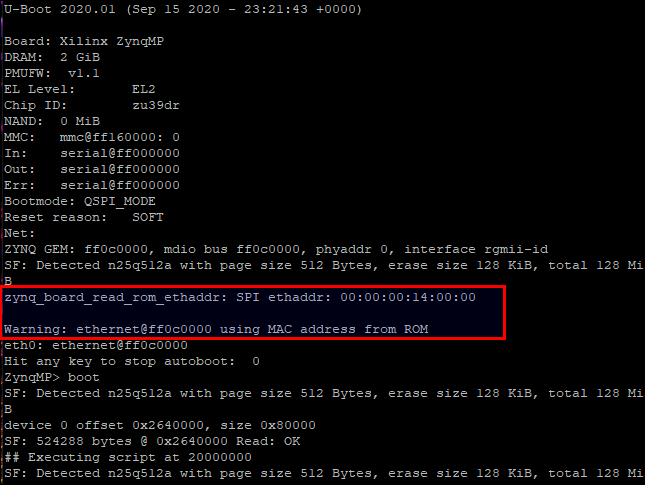
<p>Example U-Boot output:</p>

<p><img width="600px" src="/images/2020-09-16-U-Boot-handling-MAC-address/u-boot-reading-mac.png" /></p>

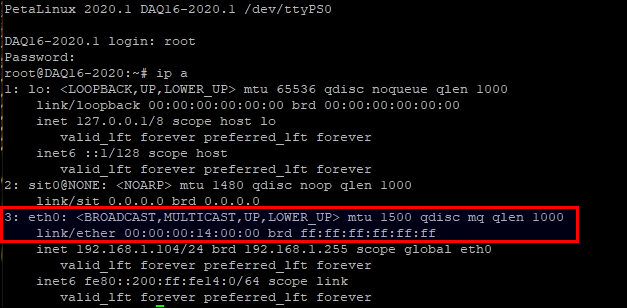
<p>Linux reading address passed from U-Boot:</p>

<p><img width="600px" src="/images/2020-09-16-U-Boot-handling-MAC-address/mac-from-linux.png" /></p>

<p>It’s interesting to note that if U-Boot has a MAC address in its environment partition, and another redundant MAC address in a SPI offset, it will give priority to its environment value. It will throw a warning message in this case:</p>

<div class="language-plaintext highlighter-rouge"><div class="highlight"><pre class="highlight"><code>ZYNQ GEM: ff0c0000, mdio bus ff0c0000, phyaddr 0, interface rgmii-id
SF: Detected n25q512a with page size 512 Bytes, erase size 128 KiB, total 128 MiB
zynq_board_read_rom_ethaddr: SPI ethaddr: FF:FF:FF:FF:FF:FF

Warning: ethernet@ff0c0000 MAC addresses don't match:
Address in ROM is               ff:ff:ff:ff:ff:ff
Address in environment is       70:b3:d5:1a:70:06
</code></pre></div></div>

<h3 id="the-mac-handoff">The MAC handoff</h3>

<p>Once U-Boot read the MAC address from any source and assigned it to its ethaddr variable, it will be handed off to the kernel. U-Boot will read the FIT image containing the kernel, the rootfs and the device tree, and will <em>patch</em> the device tree MAC value with its ethaddr variable just before executing the kernel. So as far the kernel is concerned, its device tree comes with the MAC address read from flash (or U-Boot environment), as if it was set in the Ethernet entry of the device tree. For example as:</p>

<div class="language-plaintext highlighter-rouge"><div class="highlight"><pre class="highlight"><code>&amp;gem0 {
    local-mac-address = [00 0a 35 00 22 20];
    &lt;...&gt;
};
</code></pre></div></div>

<h3 id="conclusion">Conclusion</h3>

<p>We analyzed several different approaches for storing a MAC address in non-volatile memory, and how to use U-Boot to retrieve it and pass it on to the kernel at boot time.</p>]]></content><author><name></name></author><category term="blog" /><category term="Petalinux" /><category term="U-Boot" /><category term="SPI" /><category term="flash" /><summary type="html"><![CDATA[There’s several ways for U-Boot to store the Ethernet MAC address in non-volatile memory set at production time. In this post, we’ll analyze the different approaches and point to solutions how to implement them.]]></summary></entry><entry><title type="html">Using PS SPI to access flash</title><link href="http://localhost:4001/blog/2020/09/10/Using-PS-SPI-to-access-flash.html" rel="alternate" type="text/html" title="Using PS SPI to access flash" /><published>2020-09-10T11:26:00-07:00</published><updated>2020-09-10T11:26:00-07:00</updated><id>http://localhost:4001/blog/2020/09/10/Using-PS-SPI-to-access-flash</id><content type="html" xml:base="http://localhost:4001/blog/2020/09/10/Using-PS-SPI-to-access-flash.html"><![CDATA[<p>The ZynqMP Processing System (PS) counts with two embedded SPI controllers that can be used to access SPI Flash devices. In this post, we configure the PS SPI to talk to an unsupported flash device, adding support by patching the Linux kernel.</p>

<h3 id="the-spi-flash">The SPI flash</h3>

<p>The Microchip SST26VF032B is populated in this particular hardware board, and until now it was supported by a combination of custom software and a custom firmware IP that does the bit-banging. In this post, we will get rid of all custom code and modify the design to let the PS SPI handle the device, and the kernel to make it look like a system file.</p>

<h3 id="firmware">Firmware</h3>

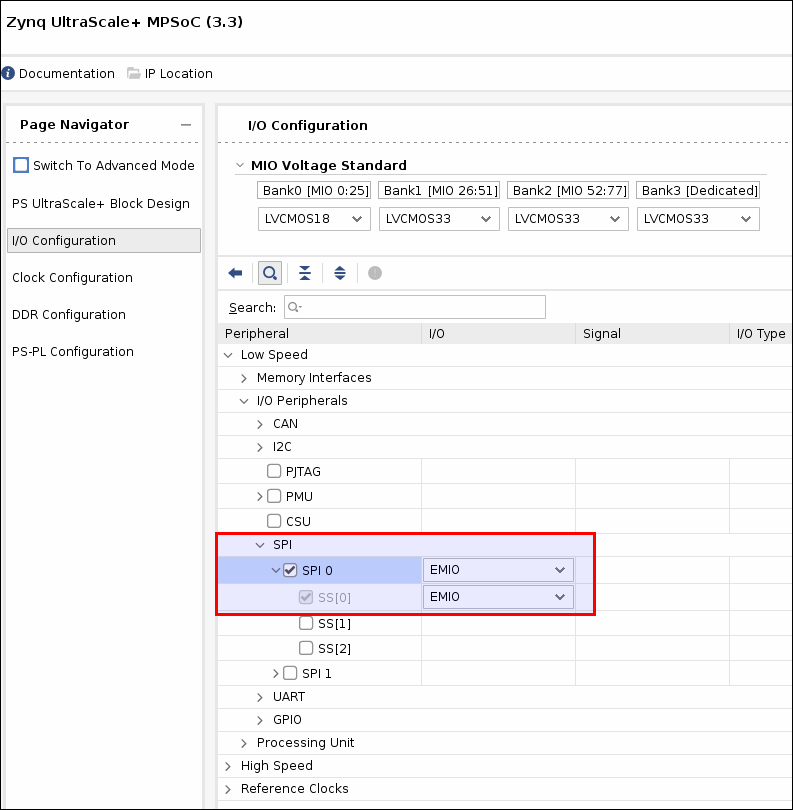
<p>Removing code is usually fun, but when it’s replaced by something more efficient, it’s doubly gratifying. Once the custom firmware code is removed, we enable the PS SPI0 controller in the PS configuration in Vivado, and hook up the I/O pins to the flash device accordingly. Since the pins were controlled by PL, we set the I/Os to EMIO. This will create a set of ports in the block design that will control the pins direction using I/O buffers.</p>

<p><img width="600px" src="/images/2020-09-10-Using-PS-SPI-to-access-flash/ps-spi-config.png" /></p>

<p>This is the block design wrapper showing the new ports: flash_spi_[io0, io1, sck, ss].</p>

<div class="language-plaintext highlighter-rouge"><div class="highlight"><pre class="highlight"><code>     gpio1_p_tri_io       : inout STD_LOGIC_VECTOR ( 11 downto 0 );
     gpio2_n_tri_io       : inout STD_LOGIC_VECTOR ( 10 downto 0 );
     gpio2_p_tri_io       : inout STD_LOGIC_VECTOR ( 10 downto 0 );
+    flash_spi_io0_io     : inout STD_LOGIC;
+    flash_spi_io1_io     : inout STD_LOGIC;
+    flash_spi_sck_io     : inout STD_LOGIC;
+    flash_spi_ss_io      : inout STD_LOGIC_VECTOR ( 0 to 0 );
     m00_axis_tdata       : out STD_LOGIC_VECTOR ( ADC_IF_WIDTH-1 downto 0 );
     m00_axis_tready      : in STD_LOGIC;
     m00_axis_tvalid      : out STD_LOGIC;
</code></pre></div></div>

<p>Also shown below are the IOBUF instances that control the I/O direction: (only showing one)</p>

<div class="language-plaintext highlighter-rouge"><div class="highlight"><pre class="highlight"><code>+  flash_spi_io0_iobuf: component IOBUF
+     port map (
+      I =&gt; flash_spi_io0_o,
+      IO =&gt; flash_spi_io0_io,
+      O =&gt; flash_spi_io0_i,
+      T =&gt; flash_spi_io0_t
+    );
</code></pre></div></div>

<p>Then at the top level, at the block design instance, we hook up these bidirectional pins to the top level ports:</p>

<div class="language-plaintext highlighter-rouge"><div class="highlight"><pre class="highlight"><code>+    flash_spi_io0_io          =&gt; rom_sdi,
+    flash_spi_io1_io          =&gt; rom_sdo,
+    flash_spi_sck_io          =&gt; rom_sck,
+    flash_spi_ss_io(0)        =&gt; rom_cs_n,
</code></pre></div></div>

<p>So that’s it as far as firmware is concerned. We removed the old bit-banger firmware module, and enabled the PS SPI controller to connect to the existing flash ports.</p>

<h3 id="device-tree">Device tree</h3>

<p>After we re-build using the exported hardware image (.xsa), we inspect the device tree that Petalinux generates automatically, in the ./images/linux directory.</p>

<div class="language-plaintext highlighter-rouge"><div class="highlight"><pre class="highlight"><code>dtc -I dtb -O dts -o system.dts system.dtb
</code></pre></div></div>

<p>In the device tree, we see the SPI0 controller is now enabled:</p>

<div class="language-plaintext highlighter-rouge"><div class="highlight"><pre class="highlight"><code>spi@ff040000 {
  compatible = "cdns,spi-r1p6";
  status = "okay";
  interrupt-parent = &lt;0x04&gt;;
  interrupts = &lt;0x00 0x13 0x04&gt;;
  reg = &lt;0x00 0xff040000 0x00 0x1000&gt;;
  clock-names = "ref_clk\0pclk";
  #address-cells = &lt;0x01&gt;;
  #size-cells = &lt;0x00&gt;;
  power-domains = &lt;0x0c 0x23&gt;;
  clocks = &lt;0x03 0x3a 0x03 0x1f&gt;;
  is-decoded-cs = &lt;0x00&gt;;
  num-cs = &lt;0x01&gt;;
  phandle = &lt;0x67&gt;;
};
</code></pre></div></div>

<p>So we need to tell Linux about the flash device we’re connecting to, as it has no way to know from the firmware design. We add an entry within the SPI controller entry above in our system-user.dtsi:</p>

<div class="language-plaintext highlighter-rouge"><div class="highlight"><pre class="highlight"><code>&amp;spi0 {
  flash@1 {
    compatible = "sst26vf032b", "jedec,spi-nor";
    reg = &lt;0x00&gt;;
    spi-max-frequency = &lt;50000000&gt;;
    #address-cells = &lt;0x01&gt;;
    #size-cells = &lt;0x01&gt;;

    flash@00000000 {
      label = "cal-rom";
      reg = &lt;0x00 0x400000&gt;;
    };
  };
};
</code></pre></div></div>

<p>We specify that the flash device is handled by the <em>spi-nor</em> generic driver (or should…), the SPI max frequency of the device in Hz, and the name of the sole partition “cal-rom”. So far, so good.</p>

<h3 id="petalinux-boot">Petalinux boot</h3>

<p>When we boot the target, we’re welcome by the following message, indicating the flash device has been accessed but the JEDEC ID is not known to the device driver.</p>

<div class="language-plaintext highlighter-rouge"><div class="highlight"><pre class="highlight"><code>[ 3.749023] spi-nor spi1.0: unrecognized JEDEC id bytes: bf 26 42 bf 26 42
</code></pre></div></div>

<p>The datasheet for the flash device shows these numbers match:</p>

<p><img width="600px" src="/images/2020-09-10-Using-PS-SPI-to-access-flash/jedec-id.png" /></p>

<h3 id="device-driver">Device driver</h3>

<p>The source code for the driver is in the linux-xlnx git repo under drivers/mtd/spi-nor/spi-nor.c. Inspecting the device driver, we find there’s two devices that very closely match ours:</p>

<div class="language-plaintext highlighter-rouge"><div class="highlight"><pre class="highlight"><code>{ "sst26vf016b", INFO(0xbf2641, 0, 64 * 1024, 32,  SECT_4K | SST_GLOBAL_PROT_UNLK) },
{ "sst26vf064b", INFO(0xbf2643, 0, 64 * 1024, 128, SECT_4K | SPI_NOR_DUAL_READ | SPI_NOR_QUAD_READ) },
</code></pre></div></div>

<p>We see the INFO macro definition to help figure out what those arguments mean:</p>

<div class="language-plaintext highlighter-rouge"><div class="highlight"><pre class="highlight"><code>#define INFO(\_jedec_id, \_ext_id, \_sector_size, \_n_sectors, \_flags)
</code></pre></div></div>

<p>So, we’ll have to “insert” our device there with the proper capabilities, patching the kernel.</p>

<h3 id="patching-kernel">Patching kernel</h3>

<p>Petalinux counts with a feature that allows to patch a given source (U-Boot, Kernel, etc.) and copy the sources into the meta-user area, to keep in the build. First, we have to petalinux-config to change the build tool to devtool. For some reason, setting it to bitbake produces strange results, YMMV.</p>

<div class="language-plaintext highlighter-rouge"><div class="highlight"><pre class="highlight"><code># petalinux-build -c kernel -x modify
</code></pre></div></div>

<p>This command will leave the Linux tree under the components directory, ready to be modified. Look under <proj>/components/yocto/workspace/sources/linux-xlnx/drivers/mtd/spi-nor/spi-nor.c</proj></p>

<p>The device is defined as 64*1024 sector size x 64 sectors = 0x400000 bytes (4 MByte = 32 Mbits). This size parameter is also set in the device tree entry above.</p>

<div class="language-plaintext highlighter-rouge"><div class="highlight"><pre class="highlight"><code>{ "sst26vf032b", INFO(0xbf2642, 0, 64 * 1024, 64, SECT_4K | SST_GLOBAL_PROT_UNLK) },	
</code></pre></div></div>

<p>Once the changes to spi-nor.c are made, we need to git-commit them.</p>

<div class="language-plaintext highlighter-rouge"><div class="highlight"><pre class="highlight"><code># git add spi-nor.c
# git commit -m "Add mx66u2g45g spi-nor device"
</code></pre></div></div>

<p>Then we “finish” the kernel edit with:</p>

<div class="language-plaintext highlighter-rouge"><div class="highlight"><pre class="highlight"><code># petalinux-build -c kernel -x finish
</code></pre></div></div>

<p>Petalinux then should copy the kernel patch to the meta-user area under recipes-kernel. Be careful if you have other patches there, because devtool will overwrite them. I’d copy them somewhere safe, and then copy them back.</p>

<h3 id="new-boot-smell">New boot smell</h3>

<p>Booting with the new changes looks much better:</p>

<div class="language-plaintext highlighter-rouge"><div class="highlight"><pre class="highlight"><code>root@DAQ16-2020:~# dmesg|grep spi
[    5.490138] spi-nor spi1.0: sst26vf032b (4096 Kbytes)
[    5.495201] 1 fixed-partitions partitions found on MTD device spi1.0
[    5.501546] Creating 1 MTD partitions on "spi1.0":
[    5.674365] zynqmp-qspi ff0f0000.spi: ignoring dependency for device, assuming no driver
[    5.685249] spi-nor spi0.0: mt25qu512a (n25q512a) (131072 Kbytes)
[    5.691363] 4 fixed-partitions partitions found on MTD device spi0.0
[    5.697710] Creating 4 MTD partitions on "spi0.0":
</code></pre></div></div>

<p>We have the spi1.0 device connected to our flash, and the spi0.0 connected to the existing QSPI device. We can show all mtd devices, partitions and properties:</p>

<div class="language-plaintext highlighter-rouge"><div class="highlight"><pre class="highlight"><code>root@DAQ16-2020:~# cat /proc/mtd
dev:    size   erasesize  name
mtd0: 00400000 00001000 "cal-rom"
mtd1: 02600000 00002000 "boot"
mtd2: 00040000 00002000 "bootenv"
mtd3: 00040000 00002000 "bootscr"
mtd4: 05980000 00002000 "kernel"
</code></pre></div></div>

<p>We can also read the /dev/mtd0 device and dump its contents:</p>

<div class="language-plaintext highlighter-rouge"><div class="highlight"><pre class="highlight"><code>root@DAQ16-2020:~# cat /dev/mtd0 | od -x
0000000 0000 4400 0000 4400 0000 4100 0000 5100
0000020 0000 3400 0000 0000 0000 0000 0000 0000
0000040 0000 0000 0000 0000 0000 0000 0000 0000
*
</code></pre></div></div>

<h3 id="conclusion">Conclusion</h3>

<p>We have changed the firmware to make use of the embedded PS SPI controller and after finding the kernel didn’t support our device, we patched it to add support. Less fabric resources and custom software, coupled with more portability and OS support.</p>]]></content><author><name></name></author><category term="blog" /><category term="Petalinux" /><category term="SPI" /><category term="flash" /><category term="mtd" /><summary type="html"><![CDATA[The ZynqMP Processing System (PS) counts with two embedded SPI controllers that can be used to access SPI Flash devices. In this post, we configure the PS SPI to talk to an unsupported flash device, adding support by patching the Linux kernel.]]></summary></entry><entry><title type="html">U-Boot 2020.1 changes to distro boot</title><link href="http://localhost:4001/blog/2020/09/03/U-Boot-changes-to-distro-boot.html" rel="alternate" type="text/html" title="U-Boot 2020.1 changes to distro boot" /><published>2020-09-03T11:42:00-07:00</published><updated>2020-09-03T11:42:00-07:00</updated><id>http://localhost:4001/blog/2020/09/03/U-Boot-changes-to-distro-boot</id><content type="html" xml:base="http://localhost:4001/blog/2020/09/03/U-Boot-changes-to-distro-boot.html"><![CDATA[<p>One of the disrupting changes that Petalinux 2020.1 has brought, includes U-Boot moving to what’s called “distro boot”. In this post, we discuss how to handle them while upgrading from earlier versions.</p>

<h3 id="distro-boot">Distro boot</h3>

<p>Distro boot is an attempt from U-Boot to standarize their booting sequence among SoC platforms, to be closer to what it is in the PC world with BIOS/EFI. Xilinx moved to distro boot in their Petalinux 2020.1 release, and this <a href="https://xilinx-wiki.atlassian.net/wiki/spaces/A/pages/749142017/Using+Distro+Boot+With+Xilinx+U-Boot">Distro Boot with Xilinx U-Boot</a> article explains the subject quite clearly.</p>

<h3 id="overview">Overview</h3>

<p>The new U-Boot approach consists in a new boot script that is executed after U-Boot is ready to load the next stage. This script, namely boot.scr, contains instructions regarding where to load the binaries from media, to continue with the next stage. The boot script is expected to be found in the boot media selected by the boot mode pins, e.g. QSPI, SD, etc. This script is generated by Petalinux in the images/linux output directory.
If the boot mode pins select SD or MMC card, the boot.scr script is expected to be found in the same FAT32 partition where boot.bin and image.ub reside.
If instead the boot mode is set to QSPI, a new partition in the QSPI media must be created, and the script must be burned in that partition, as we’ll see below.</p>

<h3 id="qspi-mode">QSPI mode</h3>

<p>In this boot mode, we need to create a new partition to hold the boot.scr script. We use the <em>petalinux-config</em> command to add it.
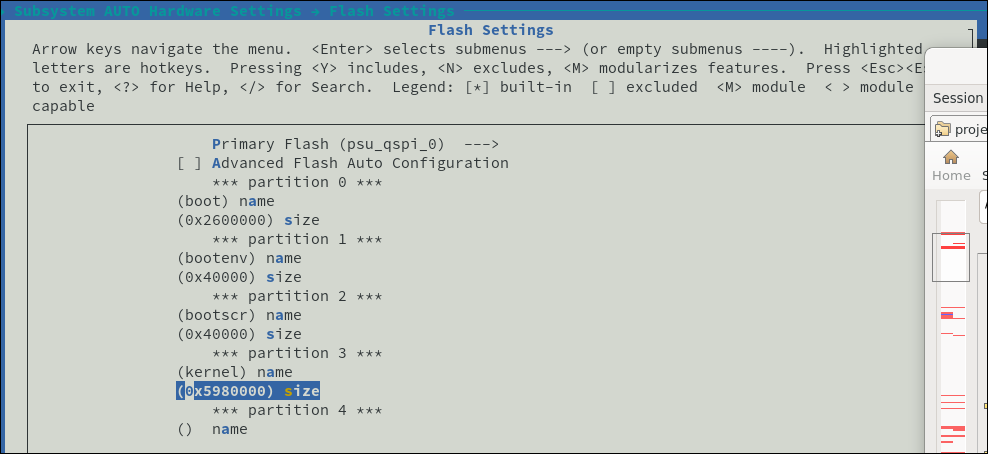
Under Subsystem AUTO Hardware Settings -&gt; Flash Settings, we add a new partition called “bootscr” which by default should be 0x80000 in size. This size is according to the U-Boot environment variable <em>script_size_f</em> that is hardcoded in the source. In the screenshot, it is set to 0x40000 but since the script is about 2k in size, this is not a problem.</p>

<p><img width="644px" src="/images/2020-09-03-U-Boot-changes-to-distro-boot/flash-settings.png" /></p>

<p>The resulting offset to the bootscr partition will then be (0x2600000+0x40000=) 0x2640000.</p>

<p>Under Auto Config Settings, the u-boot autoconfig checkbox must be unchecked.
Then under U-Boot configuration, U-Boot config should be set to “other”, and u-boot config target should be set to “xilinx_zynqmp_virt_defconfig”.</p>

<p>At this point, we have the boot.scr partition offset, so we have to let the build know where to find it. We have two ways, either:</p>
<ul>
  <li>
    <p>Modify the recipes-bsp/u-boot/files/platform-top.h. Adding a line:</p>

    <div class="language-plaintext highlighter-rouge"><div class="highlight"><pre class="highlight"><code>  CONFIG_BOOT_SCRIPT_OFFSET=0x2640000
</code></pre></div>    </div>
  </li>
  <li>
    <p>Configure u-boot to set it automatically.</p>

    <div class="language-plaintext highlighter-rouge"><div class="highlight"><pre class="highlight"><code>  # petalinux-config -c u-boot
</code></pre></div>    </div>

    <p>-&gt; ARM Architecture -&gt; Boot script offset -&gt; 0x2640000  (near the bottom)</p>

    <div class="language-plaintext highlighter-rouge"><div class="highlight"><pre class="highlight"><code>  # petalinux-build -c u-boot -x finish
</code></pre></div>    </div>

    <p>This change will generate the recipes-bsp/u-boot/files/devtool-fragment.h with the offset setting.</p>
  </li>
</ul>

<p>Now somewhat redundantly, we need to inform u-boot again, where to find the bootscr partition offset, by modifying the following lines in recipes-bsp/u-boot/u-boot-zynq-scr.bbappend:</p>

<div class="language-plaintext highlighter-rouge"><div class="highlight"><pre class="highlight"><code>QSPI_KERNEL_OFFSET = "0x2680000"
...
QSPI_FIT_IMAGE_SIZE = "0x5980000"
</code></pre></div></div>

<p>In my case, the device is a Zynq RFSoC, so the lines *_zynqmpdr had to be modified instead.</p>

<div class="language-plaintext highlighter-rouge"><div class="highlight"><pre class="highlight"><code>QSPI_KERNEL_OFFSET_zynqmpdr = "0x2680000"
...
QSPI_FIT_IMAGE_SIZE_zynqmpdr = "0x5980000"
</code></pre></div></div>

<p>The u-boot/u-boot-zynq-scr.bbappend script takes the u-boot-zynq-scr/boot.cmd.default.initrd as a template, uses the variables declared above, and generates the u-boot-zynq-scr/boot.cmd.default. This latter script in the build is compiled into the boot.scr using the mkimage command.</p>

<h3 id="sd-or-emmc-mode">SD or [e]MMC mode</h3>

<p>For these modes, the process is straighforward. Make sure to copy the generated boot.scr to the boot media in question, along with BOOT.BIN and image.ub. The relevant boot.scr script snippet is shown below, highlighting the method that loads the FIT image.ub using the fatload command, and then executing it, i.e. the kernel.</p>

<div class="language-plaintext highlighter-rouge"><div class="highlight"><pre class="highlight"><code>if test "${boot_target}" = "mmc0" || test "${boot_target}" = "mmc1" ; then
   if test -e ${devtype} ${devnum}:${distro_bootpart} /image.ub; then
      fatload ${devtype} ${devnum}:${distro_bootpart} 0x10000000 image.ub;
      bootm 0x10000000;
      exit;
   fi
   ...
</code></pre></div></div>

<h3 id="build">Build</h3>

<p>At this point, all settings are in place for QSPI, so we’ll build it.</p>

<div class="language-plaintext highlighter-rouge"><div class="highlight"><pre class="highlight"><code># petalinux-build -c u-boot -x cleanall
# petalinux-build
# petalinux-package --boot --u-boot --fsbl --fpga --pmufw --force
</code></pre></div></div>

<p>The BOOT.BIN, image.ub and boot.scr will be generated under images/linux directory. From here, we burn them to QSPI using the program_flash command at their respective offsets:</p>

<div class="language-plaintext highlighter-rouge"><div class="highlight"><pre class="highlight"><code>program_flash -f BOOT.BIN -offset 0 -flash_type qspi_dual_parallel -fsbl zynqmp_fsbl.elf -cable type xilinx_tcf url TCP:192.168.1.177:3121

program_flash -f boot.scr -offset 0x2640000 -flash_type qspi_dual_parallel -fsbl zynqmp_fsbl.elf -cable type xilinx_tcf url TCP:192.168.1.177:3121

program_flash -f image.ub -offset 0x2680000 -flash_type qspi_dual_parallel -fsbl zynqmp_fsbl.elf -cable type xilinx_tcf url TCP:192.168.1.177:3121
</code></pre></div></div>

<h3 id="booting-and-looking-under-the-hood">Booting and looking under the hood</h3>

<p>U-Boot runs a default script (as environment variable) when the timeout count expires, called “bootcmd”. This script has been extended in distro boot to run another script:</p>

<div class="language-plaintext highlighter-rouge"><div class="highlight"><pre class="highlight"><code>ZynqMP&gt; printenv bootcmd
bootcmd=run distro_bootcmd
</code></pre></div></div>

<p>The distro_bootcmd in turn runs through a list of boot devices and attempts to run one script for each, also defined as environment variables:</p>

<div class="language-plaintext highlighter-rouge"><div class="highlight"><pre class="highlight"><code>ZynqMP&gt; printenv distro_bootcmd
distro_bootcmd=scsi_need_init=; for target in ${boot_targets}; do run boot_cmd${target}; done
ZynqMP&gt; printenv boot_targets
boot_targets=qspi0 jtag mmc0 mmc1 qspi0 nand0 usb0 usb1 scsi0 pxe dhcp
</code></pre></div></div>

<p>The boot_targets is a list of possible media where to boot from, and Xilinx adds a first element according to the device that is set in the boot mode pins. Such that booting from QSPI, the first script that runs would be “bootcmd_qspi0”.</p>

<div class="language-plaintext highlighter-rouge"><div class="highlight"><pre class="highlight"><code>ZynqMP&gt; printenv bootcmd_qspi0
bootcmd_qspi0=sf probe 0 0 0 &amp;&amp; sf read $scriptaddr $script_offset_f $script_size_f &amp;&amp; source ${scriptaddr}; echo SCRIPT FAILED: continuing...;

ZynqMP&gt; printenv script_offset_f
script_offset_f=2640000
ZynqMP&gt; printenv script_size_f
script_size_f=0x80000
</code></pre></div></div>

<p>Parsing through the bootcmd_qspi0 command, we see that it first will initialize the QSPI device (sf probe), then will attempt to read a block of memory from QSPI at offset $script_offset_f size $script_size_f and to place it in memory at address $scriptaddr. Once successfully read from QSPI, it will continue to execute (source) the script at that offset. If any of those commands fail, the command will state so and finish.</p>

<p>If the script is found and executed successfully, U-Boot runs these commands below from the script (in QSPI case). You can see these commands in the u-boot-zynq-scr/boot.cmd.default file.</p>

<div class="language-plaintext highlighter-rouge"><div class="highlight"><pre class="highlight"><code>if test "${boot_target}" = "xspi0" || test "${boot_target}" = "qspi" || test "${boot_target}" = "qspi0"; then
   sf probe 0 0 0;
   if test "image.ub" = "image.ub"; then
      sf read 0x10000000 0x2680000 0x5980000;
      bootm 0x10000000;
      exit;
   fi
...
</code></pre></div></div>

<p>The U-Boot output in a successful QSPI boot would look like the following. Here you can see the first QSPI access at offset 0x2640000 to read the boot.scr partition, and once loaded and executed, the boot.scr script does another QSPI access to read the actual kernel at offset 0x2680000.</p>

<div class="language-plaintext highlighter-rouge"><div class="highlight"><pre class="highlight"><code>ZynqMP&gt; boot
Warning: SPI speed fallback to 100 kHz
SF: Detected n25q512a with page size 512 Bytes, erase size 128 KiB, total 128 MiB
device 0 offset 0x2640000, size 0x80000
SF: 524288 bytes @ 0x2640000 Read: OK
## Executing script at 20000000
SF: Detected n25q512a with page size 512 Bytes, erase size 128 KiB, total 128 MiB
device 0 offset 0x2680000, size 0x5980000
SF: 93847552 bytes @ 0x2680000 Read: OK
## Loading kernel from FIT Image at 10000000 ...
...
</code></pre></div></div>

<h3 id="boot-analysis">Boot analysis</h3>

<p>When U-Boot runs, it prints very helpful information regarding its actions, and can be used to debug when something is not expected, as shown in these two failing cases.</p>

<p>In this first case, we see U-Boot attempt to read the boot.scr script at the default offset 0x3e80000 and failing to find it. This may happen if the CONFIG_BOOT_SCRIPT_OFFSET hasn’t been set, as shown above.</p>

<div class="language-plaintext highlighter-rouge"><div class="highlight"><pre class="highlight"><code>SF: Detected n25q00a with page size 256 Bytes, erase size 64 KiB, total 128 MiB
device 0 offset 0x3e80000, size 0x80000
SF: 524288 bytes @ 0x3e80000 Read: OK
## Executing script at 20000000
Wrong image format for "source" command
SCRIPT FAILED: continuing...
</code></pre></div></div>

<p>Then, in this other case, the boot.scr script is found in QSPI at the given offset (i.e. 0x2640000), but the script itself points to offset 0xf00000 and this does not match the kernel partition offset, resulting in another error. This is likely the case if the u-boot-zynq-scr.bbappend hasn’t been modified to include the proper offset to the kernel partition, as shown above.</p>

<div class="language-plaintext highlighter-rouge"><div class="highlight"><pre class="highlight"><code>SF: Detected n25q00a with page size 256 Bytes, erase size 64 KiB, total 128 MiB
device 0 offset 0x2640000, size 0x80000
SF: 524288 bytes @ 0x2640000 Read: OK
## Executing script at 20000000
SF: Detected n25q00a with page size 256 Bytes, erase size 64 KiB, total 128 MiB
device 0 offset 0xf00000, size 0x6400000
SF: 104857600 bytes @ 0xf00000 Read: OK
Wrong Image Format for bootm command
ERROR: can't get kernel image!
SCRIPT FAILED: continuing...
switch to partitions #0, OK
</code></pre></div></div>

<h3 id="conclusion">Conclusion</h3>

<p>This U-Boot change was quite frustrating when 2020.1 was released, because of very poor or inexistent documentation regarding how Xilinx handled it. This has been since corrected with an excelent article in the wiki, as pointed above. The extra points highlighted in this post are missing from the article and in my opinion are necessary for a smooth upgrade to 2020.1.</p>]]></content><author><name></name></author><category term="blog" /><category term="Petalinux" /><category term="u-boot" /><category term="QSPI" /><category term="JTAG" /><category term="boot" /><category term="2020.1" /><summary type="html"><![CDATA[One of the disrupting changes that Petalinux 2020.1 has brought, includes U-Boot moving to what’s called “distro boot”. In this post, we discuss how to handle them while upgrading from earlier versions.]]></summary></entry><entry><title type="html">JTAG boot in QSPI mode</title><link href="http://localhost:4001/blog/2020/08/27/JTAG-boot-in-QSPI-mode.html" rel="alternate" type="text/html" title="JTAG boot in QSPI mode" /><published>2020-08-27T17:32:00-07:00</published><updated>2020-08-27T17:32:00-07:00</updated><id>http://localhost:4001/blog/2020/08/27/JTAG-boot-in-QSPI-mode</id><content type="html" xml:base="http://localhost:4001/blog/2020/08/27/JTAG-boot-in-QSPI-mode.html"><![CDATA[<p>Booting a ZynqMP target over JTAG is very useful for a development cycle, as the alternative to programming the flash device is time consuming. However, while in previous Xilinx Vivado versions (&lt;=2017.2) programming the QSPI flash was possible over JTAG, in the latest versions of the tool, the programming fails with errors.</p>

<h3 id="boot-mode">Boot mode</h3>

<p>The Zynq devices have 4 boot pins that are sampled at boot time and indicate which device will be used to load its binaries from. These may be set to QSPI, MMC, NAND or JTAG. The JTAG mode is generally used to stall the loading until the host provides the binaries over JTAG, for development purposes. In previous versions of the tool, JTAG would work to load binaries regardless of the boot mode pins, but on the last few versions it is mandatory to set the boot pins to JTAG, or the loading fails. Unfortunately there is already hardware in the field that hard-coded these mode pins to a particular mode (i.e. QSPI) relying on the capability of the hardware to always fall back to JTAG if development required it. With these new versions, this is not possible out of the box, so in this post we will discuss how to work around this limitation.</p>

<h3 id="the-load-error">The load error</h3>

<p>The target in question is hard-wired to QSPI mode, and loading the binaries over JTAG is possible… as long as the QSPI memory is empty. Once QSPI has binaries loaded in it, they will be executed while the FSBL is loading and about to run, messing up the process and ultimately leading to a program error. Ideally, the processor should be halted until the FSBL is loaded and has run, but this is not the case. In this boot log, notice the boot mode set to QSPI_MODE.</p>

<div class="language-plaintext highlighter-rouge"><div class="highlight"><pre class="highlight"><code>Xilinx Zynq MP First Stage Boot Loader
Release 2019.2   Aug 27 2020  -  22:26:51
NOTICE:  ATF running on XCZU5EV/silicon v4/RTL5.1 at 0xfffea000
NOTICE:  BL31: Secure code at 0x0
NOTICE:  BL31: Non secure code at 0x8000000
NOTICE:  BL31: v2.0(release):xilinx-v2019.1-12-g713dace9
NOTICE:  BL31: Built : 00:04:32, Aug 27 2020
PMUFW:  v1.1

U-Boot 2019.01 (Aug 27 2020 - 00:45:45 +0000)

Board: Xilinx ZynqMP
DRAM:  2 GiB
EL Level:       EL2
Chip ID:        zu5ev
MMC:   mmc@ff160000: 0
Loading Environment from SPI Flash... SF: Detected s25fl512s_256k with page size 256 Bytes, erase size 256 KiB, total 64 MiB
*** Warning - bad CRC, using default environment

## Error: flags type check failure for "serverip" &lt;= "AUTO" (type: i)
himport_r: can't insert "serverip=AUTO" into hash table
In:    serial@ff000000
Out:   serial@ff000000
Err:   serial@ff000000
Board: Xilinx ZynqMP
Bootmode: QSPI_MODE
Reset reason:   DEBUG
Net:   ZYNQ GEM: ff0b0000, phyaddr 3, interface rgmii-id
eth0: ethernet@ff0b0000, eth-1: ethernet@ff0c0000, eth-1: ethernet@ff0d0000, eth-1: ethernet@ff0e0000
U-BOOT for xu5-eths

Hit any key to stop autoboot:  0
ZynqMP&gt; "Synchronous Abort" handler, esr 0x02000000
elr: 00000000881e3008 lr : 0000000008043470 (reloc)
elr: 00000000fffea008 lr : 000000007fe4a470
x0 : 0000000030c50830 x1 : 0000000000000001
&lt;...&gt;
x26: 0000000000000000 x27: 0000000000000000
x28: 000000007fead97c x29: 000000007ddbacc0

Resetting CPU ...

### ERROR ### Please RESET the board ###
</code></pre></div></div>

<h3 id="workarounds">Workarounds</h3>

<p>Folks have found ways to work around this issue in several ways.</p>

<ol>
  <li>Use an older version of the tools to load the binaries, which is generally cumbersome.</li>
  <li>Use a modified version of the FSBL to use to load the binaries, and another version (the original) to include in the binaries to be programmed. The modified version would ignore the mode pins in the code, and assume it sampled them as JTAG, so the binary loading is skipped, i.e. stalling the target.</li>
  <li>Use a combination of Vivado and Vitis to coerce the target to the right mode. Attempt writing the bitstream using Vivado first, then using Vitis to do the same thing. And then finally, after re-starting Vivado, attempt programming the flash binaries (BOOT.BIN, image.ub) using hardware manager, to finally succeed. Somehow, this procedure sets the target to a happy mode.</li>
</ol>

<h3 id="the-alternative">The alternative</h3>

<p>Digging through the ZynqMP memory map, the register BOOT_MODE_USER from CTL_APB module contains two undocumented (as far as I can tell) fields that can be used to <em>fake</em> the boot mode pins under software control on demand.
The script below uses these fields to set the alternate boot mode to JTAG, regardless of the actual boot mode pins hard-wired to QSPI. In this output snippet you can see the boot mode set to JTAG, disregarding the mode pins.</p>

<div class="language-plaintext highlighter-rouge"><div class="highlight"><pre class="highlight"><code>U-Boot 2019.01 (Aug 27 2020 - 22:25:58 +0000)

Board: Xilinx ZynqMP
DRAM:  2 GiB
EL Level:       EL2
Chip ID:        zu5ev
MMC:   mmc@ff160000: 0, mmc@ff170000: 1
Loading Environment from FAT...
himport_r: can't insert "serverip=AUTO" into hash table
In:    serial@ff000000
Out:   serial@ff000000
Err:   serial@ff000000
Board: Xilinx ZynqMP
Bootmode: JTAG_MODE
Reset reason:   DEBUG
Net:   ZYNQ GEM: ff0b0000, phyaddr 3, interface rgmii-id
eth0: ethernet@ff0b0000, eth-1: ethernet@ff0c0000, eth-1: ethernet@ff0d0000, eth-1: ethernet@ff0e0000
U-BOOT for xu5-eths
</code></pre></div></div>

<h3 id="the-secret-sauce">The secret sauce</h3>

<p>The script writes to the BOOT_MODE_USER register before running the FSBL using these commands:</p>

<div class="language-plaintext highlighter-rouge"><div class="highlight"><pre class="highlight"><code># Read boot mode
set mode [expr [mrd -value 0xFF5E0200] &amp; 0xf]
puts stderr "INFO: Boot mode set to $mode"
puts stderr "INFO: Forcing Alternate boot mode to JTAG"
mwr 0xFF5E0200 0x100
</code></pre></div></div>

<p>The script expects the binaries to be found under ./images/linux, i.e. the Petalinux project root directory. It’s also capable of loading the bitstream and the FIT image (image.ub) but the code is commented out.</p>

<div class="language-plaintext highlighter-rouge"><div class="highlight"><pre class="highlight"><code>$ ls images/linux/
pmufw.elf  system.dtb  bl31.elf  system.dts  zynqmp_fsbl.elf
BOOT.BIN  image.ub  system.bit  u-boot.elf &lt;...&gt;

$ xsct jtag-boot.tcl [&lt;hw_server_IP&gt;]
</code></pre></div></div>

<h3 id="conclusion">Conclusion</h3>

<p>This script uses an undocumented feature to bypass sampling the boot mode pins, and instead rely on a software workaround to use an alternate boot mode value.</p>

<p>Credits due to @jhartfiel @thammer @jott from Xilinx forum post <a href="https://forums.xilinx.com/t5/ACAP-and-SoC-Boot-and/Programming-QSPI-flash-failing/td-p/997192">Programming QSPI flash failing</a> for insight and inspiration.</p>

<h3 id="the-code">The code</h3>

<div class="language-plaintext highlighter-rouge"><div class="highlight"><pre class="highlight"><code># XSCT script
#
# The script expects an argument to the host connected to the target,
# and it will assume "localhost" if no argument is passed.
# i.e.
# /opt/petalinux/tools/xsct/bin/xsct jtag-boot.tcl 192.168.1.18
#
# The script should be run from the Petalinux project directory
# and will expect the binaries to be under ./images/linux
# from its current directory.

# Location of binaries
set images {./images/linux}
set hwdesc {./project-spec/hw-description}

if {[file exist "$images/image.ub"] == 0} {
  puts stderr "ERROR: File image.ub not found at path $images"
  exit 1
}

puts stderr "--------------------------------------------------"
puts stderr " JTAG boot, regardless of boot mode"
puts stderr "--------------------------------------------------"

# Set hardware server or 'localhost' if none given
if {[llength $argv] == 0} {
  set hwserver localhost
  puts stderr "WARNING: No host or IP argument was entered, assuming localhost."
} else {
  set hwserver [lindex $argv 0]
}
set url $hwserver:3121

if { [catch {connect -url $url -symbols}] != 0} {
  puts stderr "ERROR: Could not connect to $url host."
  exit 1
}
puts stderr "INFO: Connection to target established."
puts stderr "--------------------------------------------------"

#puts stderr "INFO: Configuring the FPGA..."
#puts stderr "INFO: Downloading bitstream: $images/system.bit to the target."
#fpga $images/system.bit

# Disable security gates for DAP, PL TAP &amp; PMU
targets -set -nocase -filter {name =~ "*PSU*"}
mask_write 0xFFCA0038 0x1C0 0x1C0

# Download PMU firmware to MicroBlaze PMU
targets -set -nocase -filter {name =~ "*MicroBlaze PMU*"}
catch {stop}; after 1000
puts stderr "INFO: Downloading PMU firmware $images/pmufw.elf"
dow $images/pmufw.elf
after 2000
con

targets -set -nocase -filter {name =~ "*APU*"}
mwr 0xffff0000 0x14000000
mask_write 0xFD1A0104 0x501 0x0

# Read boot mode
set mode [expr [mrd -value 0xFF5E0200] &amp; 0xf]
puts stderr "INFO: Boot mode set to $mode"
puts stderr "INFO: Forcing Alternate boot mode to JTAG"
mwr 0xFF5E0200 0x100

# Reset APU#0 and run psu_init
targets -set -nocase -filter {name =~ "*A53*#0"}
rst -processor
puts stderr "INFO: Run PSU initialization"
source $hwdesc/psu_init.tcl

# Download FSBL
rst -processor
puts stderr "INFO: Downloading FSBL $images/zynqmp_fsbl.elf"
dow $images/zynqmp_fsbl.elf
after 2000
set bp_45_33_fsbl_bp [bpadd -addr &amp;XFsbl_Exit]
con -block -timeout 50
bpremove $bp_45_33_fsbl_bp
after 5000;
catch {stop};
catch {stop};
psu_ps_pl_isolation_removal; psu_ps_pl_reset_config

puts stderr "INFO: Downloading device tree blob: $images/system.dtb at 0x00100000"
dow -data "$images/system.dtb" 0x00100000
after 2000

# Download and run u-boot
puts stderr "INFO: Downloading U-Boot $images/u-boot.elf"
dow $images/u-boot.elf

# Download and run ATF
puts stderr "INFO: Downloading ATF $images/bl31.elf"
dow $images/bl31.elf

#puts stderr "INFO: Downloading Kernel: $images/image.ub at 0x05000000"
#dow -data "$images/image.ub" 0x05000000

con
</code></pre></div></div>]]></content><author><name></name></author><category term="blog" /><category term="Linux" /><category term="Petalinux" /><category term="QSPI" /><category term="JTAG" /><category term="boot" /><summary type="html"><![CDATA[Booting a ZynqMP target over JTAG is very useful for a development cycle, as the alternative to programming the flash device is time consuming. However, while in previous Xilinx Vivado versions (&lt;=2017.2) programming the QSPI flash was possible over JTAG, in the latest versions of the tool, the programming fails with errors.]]></summary></entry><entry><title type="html">Linux Userspace Memory &amp;amp; I/O</title><link href="http://localhost:4001/blog/2020/08/15/Linux-Userspace.html" rel="alternate" type="text/html" title="Linux Userspace Memory &amp;amp; I/O" /><published>2020-08-15T17:32:00-07:00</published><updated>2020-08-15T17:32:00-07:00</updated><id>http://localhost:4001/blog/2020/08/15/Linux-Userspace</id><content type="html" xml:base="http://localhost:4001/blog/2020/08/15/Linux-Userspace.html"><![CDATA[<p>In this post we’ll be looking at how Linux handles accesses to memory devices and I/O from userspace, and comparing the default method used for development (/dev/mem) against the one better prepared for deployment (/dev/uio). We’ll also look at how to reserve memory and make it available for DMA use.</p>

<h2 id="legacy-device-drivers">Legacy device drivers</h2>

<p>The character device driver /dev/mem exists in the kernel to map device memory into user space. This kind of access is a security risk, as it allows any process to access kernel memory, and can be used only by the root user. Moreover, a bug in the user space driver could crash the kernel. Memory access can be disabled in the kernel configuration, using the CONFIG_STRICT_DEVMEM kernel setting. This a great tool for prototyping or testing new hardware but not considered an acceptable production solution for a user space device driver.</p>

<p>The legacy device driver (/dev/mem) requires the user space application to know at build time the physical address location and size of the mapped memory region. The programmable logic can re-map these regions inadvertently while adding a new device, for example, and losing access to it from software. This needs to be tightly controlled with the target software to avoid disconnects.</p>

<p>The userspace software application would map the memory after opening the /dev/mem device as follows:</p>

<div class="language-plaintext highlighter-rouge"><div class="highlight"><pre class="highlight"><code>fd=open("/dev/mem",O_RDWR);
...
ptr=mmap(NULL,page_size,PROT_READ|PROT_WRITE,MAP_SHARED,fd,(addr &amp; ~(page_size-1)));
...
*((unsigned *)(ptr+page_offset))=val;
</code></pre></div></div>

<p>There is a good example of this in the userspace application shipped with Petalinux: <em>peekpoke</em>.</p>

<p>The biggest drawback from this legacy driver method is its inability to handle interrupts. There’s simply no formal way to have interrupts working from a mapped device using the legacy device driver.</p>

<h2 id="uio-device-drivers">UIO device drivers</h2>

<p>The kernel provides a generic character device that requires no extra kernel driver code that provides several advantages over legacy drivers.
The device tree is used to mark those mapped device regions and assign them a generic UIO device, by adding the <em>“compatible = uio-generic”</em> setting to the mapped device. A new character device is created under the <em>/sys/class/uio/uioX</em> filesystem, and the corresponding device <em>/dev/uioX</em>.</p>

<p>The name of the device may be added to the device tree entry, and it would be reflected in a sysfs file under <em>/sys/class/uio/uioX/maps/mapY/name</em>. The device address and size are also defined in the device tree, and can be read from sysfs in a similar way.</p>

<div class="language-plaintext highlighter-rouge"><div class="highlight"><pre class="highlight"><code>&amp;gpio {
  compatible = "generic-uio";
  reg = &lt;0x0 0xa0000000 0x0 0x10000&gt;;
};
</code></pre></div></div>

<p>The bootargs may need to be modified to add support for generic-uio, with the setting <em>uio_pdrv_genirq.of_id=generic-uio</em>. This can be done in the device tree file system-user.dtsi:</p>

<div class="language-plaintext highlighter-rouge"><div class="highlight"><pre class="highlight"><code>/include/ "system-conf.dtsi"
/ {
  chosen {
    bootargs = " earlycon console=ttyPS0,115200 clk_ignore_unused root=/dev/ram0 rw uio_pdrv_genirq.of_id=generic-uio";
    stdout-path = "serial0:115200n8";
  };
};
</code></pre></div></div>

<p>The mapped memory can be mapped into user space using the mmap() function, without specifying the physical address since it comes transparently from the device tree, and subsequently from the hardware description file.</p>

<div class="language-plaintext highlighter-rouge"><div class="highlight"><pre class="highlight"><code>gpio_ptr = mmap(NULL, gpio_size, PROT_READ|PROT_WRITE, MAP_SHARED, fd, 0);
</code></pre></div></div>

<p>Memory accesses to this mapped area are simply accesses to internal offsets, as usual.</p>

<div class="language-plaintext highlighter-rouge"><div class="highlight"><pre class="highlight"><code>// Write
*((volatile unsigned *)(gpio_ptr + offset)) = value;
// Read
value = *((volatile unsigned *)(gpio_ptr + offset));
</code></pre></div></div>

<p>The biggest advantage of using UIO device drivers is interrupt handling. The generic driver provides one automatic interrupt mechanism completely under user space control. Reading from the character device file descriptor will block until an interrupt is received. Once an interrupt is received, the user space process continues running with interrupts disabled, and after the required processing is completed, the interrupts can be re-enabled by writing to the same file descriptor.</p>

<div class="language-plaintext highlighter-rouge"><div class="highlight"><pre class="highlight"><code>// Block until IRQ
read(fd, (void *)&amp;pending, sizeof(int));

// Read interrupt status
reg = gpio_read(gpio_ptr, GPIO_IRQ_STATUS);

// Re-enable IRQ
write(fd, (void *)&amp;reenable, sizeof(int));
</code></pre></div></div>

<h2 id="implementing-uio">Implementing UIO</h2>

<p>The benefits of moving away from legacy device driver /dev/mem to UIO are several, starting with removing hard-coded addresses and sizes to devices, and adding seamless interrupt capability.</p>

<p>The process may be constructed to take a device name instead of an [address, size] hardcoded pair. The new process would “walk” through the <em>/sys/class/uio/uioX/maps/mapY/name</em> files until it finds a name that matches the device name from the device tree. Once found, this would be the device that it would open. The following snippets of working code will show an example implementation.</p>

<div class="language-plaintext highlighter-rouge"><div class="highlight"><pre class="highlight"><code>void get_uio_by_name(char* uio_name, int *uio_dev, int *uio_map, int *uio_size)
{
  char dev_name[128] = "";
  char devNamePath[128] = "";
  char devSizePath[64] = "";
  int uio, map;

  for (uio=0; uio&lt;UIO_MAX_DEVICES; uio++) {

    for (map=0; map&lt;UIO_MAX_MAPS; map++) {

      snprintf(devNamePath, 128, "/sys/class/uio/uio%d/maps/map%d/name", uio, map);
      FILE *nameFile = fopen (devNamePath, "r");
      if (!nameFile) {
        continue;
      }

      fscanf(nameFile, "%s", dev_name);
      if (!strncmp(uio_name, dev_name, 128)) {
        snprintf(devSizePath, 64, "/sys/class/uio/uio%d/maps/map%d/size", uio, map);
        *uio_size = get_uio_size(devSizePath);
        *uio_dev = uio;
        *uio_map = map;
        break;
      }
      fclose(nameFile);
    }
  }
  return;
}
</code></pre></div></div>

<p>In a similar way, the size can be read from the same directory as <em>/sys/class/uio/uioX/maps/mapY/size</em>.</p>

<div class="language-plaintext highlighter-rouge"><div class="highlight"><pre class="highlight"><code>unsigned int get_uio_size(char* size_file)
{
    int uio_size = 0; // the return value: size of the UIO memory
    FILE* size_fp; // pointer to the file containing memory size

    size_fp = fopen(size_file, "r");

    char string[100] = "";
    fscanf(size_fp, "%s", string);
    sscanf(string, "%x", &amp;uio_size);

    fclose(size_fp);
    return uio_size;
}
</code></pre></div></div>

<p>Then when opening a named device “axil_periph”, the function <em>get_uio_by_name</em> would be called, returning the device id, map and size. The size will then be used to memory map the device’s memory into userspace.</p>

<div class="language-plaintext highlighter-rouge"><div class="highlight"><pre class="highlight"><code>int uio_dev, uio_map, uio_size;
char devPath[16];

get_uio_by_name("axil_periph", &amp;uio_dev, &amp;uio_map, &amp;uio_size);

snprintf(devPath, 16, "/dev/uio%d", uio_dev);

int uio_fd = open(devPath, O_RDWR);

base_ptr = mmap(NULL, uio_size, PROT_READ|PROT_WRITE, MAP_SHARED, uio_fd, 0);
</code></pre></div></div>

<h2 id="userspace-memory-allocation">Userspace memory allocation</h2>

<p>The kernel has to reserve special memory to be used by a DMA driver. The device tree uses a special node to accomplish this:</p>

<div class="language-plaintext highlighter-rouge"><div class="highlight"><pre class="highlight"><code>reserved-memory {
  #address-cells = &lt;2&gt;;
  #size-cells = &lt;2&gt;;
  ranges;
  reserved: buffer@0 {
    compatible = "shared-dma-pool";
    no-map;
    reg = &lt;0x5 0x0 0x0 0x20000000&gt;;
    linux,cma-default;
  };
};
</code></pre></div></div>

<p>It’s important to match the #address-cells and #size-cells to the top level property of the processor, i.e. &lt;2&gt; for ZynqMP, &lt;1&gt; for Zynq-7000, 64- and 32-bit respectively.
The reg line contains the address and size formatted as <high address=""> <low address=""> <high size=""> <low size=""> pairs. In the example, the address would be 64-bit 0x500000000, with size 0x20000000 bytes.
The reserved node name may be renamed. The buffer@0 is a label and may be renamed at will.
The driver using this reserved memory would refer to it as follows:</low></high></low></high></p>

<div class="language-plaintext highlighter-rouge"><div class="highlight"><pre class="highlight"><code>dma_proxy {
  compatible ="xlnx,dma_proxy";
  ...
  memory-region = &lt;\*&amp;reserved\*&gt;;
};
</code></pre></div></div>

<p>The memory-region property is used to link the driver with its reserved memory.</p>

<p><img width="732px" src="/images/2020-08-15-Linux-Userspace/dmesg-reserved-memory.png" /></p>

<h3 id="u-dma-buf">U-dma-buf</h3>

<p>u-dma-buf is a Linux device driver that allocates contiguous memory blocks in the kernel space as DMA buffers and makes them available from the user space. The source code can be found in <a href="https://github.com/ikwzm/udmabuf/">Gitlab u-dma-buf</a>. Note there is a built-in module available from kernel 5.x with the name <em>udmabuf</em> that is unrelated to this driver.</p>

<p>In the case of using the u-dma-buf driver, its device tree node would read:</p>

<div class="language-plaintext highlighter-rouge"><div class="highlight"><pre class="highlight"><code>udmabuf@0x00 {
    compatible = "ikwzm,u-dma-buf";
    device-name = "udmabuf0";
    minor-number = &lt;0&gt;;
    size = &lt;0x10000000&gt;;          // 256 MB
    memory-region = &lt;&amp;reserved&gt;;
};
</code></pre></div></div>

<p>Loading the u-dma-buf driver with no parameters, takes the size &amp; memory region from the device tree node:</p>

<div class="language-plaintext highlighter-rouge"><div class="highlight"><pre class="highlight"><code># cd /lib/modules/`uname -r`/extras
# insmod u-dma-buf
</code></pre></div></div>

<p><img width="644px" src="/images/2020-08-15-Linux-Userspace/insmod-u-dma-buf.png" /></p>

<p>The u-dma-buf-test kernel module, if enabled, tests the different SYNC modes in the driver:</p>

<p><img width="569px" src="/images/2020-08-15-Linux-Userspace/u-dma-buf-test.png" /></p>

<p>The test incorrectly reports physical address as 0x0, but the parsing (scanf) of the 64-bit address is wrong in the test code and it should have read 0x5_0000_0000.</p>

<p>Adding the u-dma-buf driver to the Petalinux build is quite simple. Add a new kernel module template with command below, then copy the udmabuf.c code from Github under recipes-modules/udmabuf/files. The created Makefile will handle all the build magic.</p>

<div class="language-plaintext highlighter-rouge"><div class="highlight"><pre class="highlight"><code># petalinux-create -t modules -n udmabuf --enable 
</code></pre></div></div>

<h2 id="conclusion">Conclusion</h2>

<p>The advantages to using UIO instead of the legacy /dev/mem driver are substantial. The main one is the UIO ability to handle interrupts from userspace. Others include the ability to handle devices by name set from the device tree, and thus not depending on hard coded address and sizes for the device memory to be mapped.</p>

<hr />
<hr />]]></content><author><name></name></author><category term="blog" /><category term="Linux" /><category term="Petalinux" /><category term="UIO" /><category term="reserved" /><category term="memory" /><category term="DMA" /><summary type="html"><![CDATA[In this post we’ll be looking at how Linux handles accesses to memory devices and I/O from userspace, and comparing the default method used for development (/dev/mem) against the one better prepared for deployment (/dev/uio). We’ll also look at how to reserve memory and make it available for DMA use.]]></summary></entry><entry><title type="html">Device tree hacking</title><link href="http://localhost:4001/blog/2020/07/05/Device-tree-hacking.html" rel="alternate" type="text/html" title="Device tree hacking" /><published>2020-07-05T08:22:00-07:00</published><updated>2020-07-05T08:22:00-07:00</updated><id>http://localhost:4001/blog/2020/07/05/Device-tree-hacking</id><content type="html" xml:base="http://localhost:4001/blog/2020/07/05/Device-tree-hacking.html"><![CDATA[<p>Upgrading to a newer version is always recommended, as it brings bug fixes and improvements to the code. However, sometimes upgrading is not smooth and things break, making the process often frustrating.
Such was the case when I upgraded this design running smoothly in 2019.2 to the latest Petalinux 2020.1. The standalone device tree generator tool was used to detect and fix the issue.</p>

<h2 id="device-tree-generator-tool">Device Tree Generator tool</h2>

<p>Petalinux uses this tool under the hood to generate the device tree source (dts) from the device description file (xsa) and compile it to a device tree blob (dtb). Debugging device tree issues under Petalinux is time consuming, and it’s made much easier using a standalone flow, such as explained in this useful Xilinx wiki post: 
<a href="https://xilinx-wiki.atlassian.net/wiki/spaces/A/pages/341082130/Quick+guide+to+Debugging+Device+Tree+Generator+Issues">Quick guide to debugging device tree generator issues</a></p>

<p>The makefile in the guide calls the <code class="language-plaintext highlighter-rouge">xsct</code> tool, which imports the Vivado-exported project (.xsa) and parses its components while generating the device tree source. The <code class="language-plaintext highlighter-rouge">xsct</code> tool runs this script to accomplish that:</p>

<div class="language-plaintext highlighter-rouge"><div class="highlight"><pre class="highlight"><code>proc build_dts {xsa} {
  hsi::open_hw_design $xsa
    hsi::set_repo_path ./repo
    set procs [hsi::get_cells -filter {IP_TYPE==PROCESSOR}]
    puts "Targeting [lindex $procs 0]"
    hsi::create_sw_design device-tree -os device_tree -proc [lindex $procs 0]
    hsi::generate_target -dir my_dts
    hsi::close_hw_design [hsi::current_hw_design]
}
</code></pre></div></div>

<p>This process would normally go without issue, unless it detects some problem in the actual design, such as an interrupt line not properly connected.</p>

<p>The device tree generator runs through the list of devices in the design and calls their dedicated Tcl script. Each script has access to the whole design description and configuration, which gives great flexibility to generate their particular device tree node. For instance, for each of the gigabit Ethernet MACs (GEM) it runs the <code class="language-plaintext highlighter-rouge">emacps/data/emacps.tcl</code> script, passing as parameter the instance name, i.e. “<code class="language-plaintext highlighter-rouge">psu_ethernet_0</code>”.</p>

<p><img width="800px" src="/images/2020-07-05-Device-tree-hacking/zynqmp-with-three-pcspma.png" /></p>

<p>Unfortunately, in Petalinux 2020.1 a change to this script introduced an unexpected design setting. In this case, the script parses the design expecting only one instance of the PCS/PMA IP in the design, but this design counts with <em>three</em>, triggering the following error:</p>

<div class="language-plaintext highlighter-rouge"><div class="highlight"><pre class="highlight"><code>expected integer but got "0x09 0x0A 0x0B"
ERROR: [Hsi 55-1545] Problem running tcl command ::sw_emacps::generate : expected integer but got "0x09 0x0A 0x0B"
    while executing
"format %x $val"
    (procedure "::sw_emacps::generate" line 111)
    invoked from within
"::sw_emacps::generate psu_ethernet_0"
ERROR: [Hsi 55-1442] Error(s) while running TCL procedure generate()
generate_target failed
</code></pre></div></div>

<p>Basically, the statement “<code class="language-plaintext highlighter-rouge">get_cells ... IP_NAME == gig_ethernet_pcs_pma</code>” returns a list when more than one instance is present, but the rest of the code always assumes one instance. Technically, the previous code didn’t generate correct nodes either, setting all nodes to is-internal-pcspma if any pcspma IP was present and set to sgmii. It just didn’t error out.</p>

<div class="language-plaintext highlighter-rouge"><div class="highlight"><pre class="highlight"><code>set is_pcspma [get_cells -hier -filter {IP_NAME == gig_ethernet_pcs_pma}]
if {![string_is_empty ${is_pcspma}] &amp;&amp; $phymode == 2} {
    # if eth mode is sgmii and no external pcs/pma found
    hsi::utils::add_new_property $drv_handle "is-internal-pcspma" boolean ""
}
</code></pre></div></div>

<p>The fix involves picking out the PCSPMA IP that was connected to the GEM being analyzed (i.e. drv_handle argument), from psu_ethernet_0 thru 3. For this, the last character of the GEM instance is used to index the MDIO_ENET port, and using it to check whether a PCSPMA is connected to such port.</p>

<div class="language-plaintext highlighter-rouge"><div class="highlight"><pre class="highlight"><code>set ip_id [string index $drv_handle end]
set connected_ip [hsi::utils::get_connected_stream_ip $zynq_periph "MDIO_ENET$ip_id"]
</code></pre></div></div>

<p>Admittedly, this fix is limited if multiple PCSPMA IP are sharing the MDIO line, but that’s currently the case for any MDIO sharing.</p>

<p>The name of the connected IP is then compared in a loop to all the PCSPMA instances, and the matched IP is extracted and processed as usual.</p>

<div class="language-plaintext highlighter-rouge"><div class="highlight"><pre class="highlight"><code>set ip_name [get_property NAME $connected_ip]
set all_pcspma [get_cells -hier -filter {IP_NAME == gig_ethernet_pcs_pma}]
foreach ip $all_pcspma {
  if {[get_property NAME $ip] == $ip_name} {
    set is_pcspma $ip
      break
  }
</code></pre></div></div>

<p>The last fix involves correctly handling the phy-mode case, when there is no PCSPMA on that particular GEM port and the mode is set to sgmii, such that generates the is-internal-pcspma property.</p>

<div class="language-plaintext highlighter-rouge"><div class="highlight"><pre class="highlight"><code>if {[llength $is_pcspma]} {
  &lt;...&gt;
} else {
  if {$phymode == 2} {
  # if eth mode is sgmii and no external pcs/pma found
    hsi::utils::add_new_property $drv_handle "is-internal-pcspma" boolean ""
  }
</code></pre></div></div>

<p>This post was based on my forum post reporting the problem <a href="https://forums.xilinx.com/t5/Embedded-Linux/Petalinux-2020-1-fails-to-generate-default-device-tree-but-works/m-p/1124744#M43540">Petalinux 2020.1 fails to generate default device tree, but works in 2019.2</a> and includes the patch.</p>

<h2 id="conclusion">Conclusion</h2>

<p>The standalone device tree generator is a nifty tool to handle device tree issues, in a practical and time saving way. In this post, I showed how it was used to handle and workaround a limitation in the latest version of Petalinux.</p>

<hr />
<hr />]]></content><author><name></name></author><category term="blog" /><category term="Xilinx" /><category term="Linux" /><category term="Petalinux" /><category term="Device" /><category term="Tree" /><summary type="html"><![CDATA[Upgrading to a newer version is always recommended, as it brings bug fixes and improvements to the code. However, sometimes upgrading is not smooth and things break, making the process often frustrating. Such was the case when I upgraded this design running smoothly in 2019.2 to the latest Petalinux 2020.1. The standalone device tree generator tool was used to detect and fix the issue.]]></summary></entry></feed>